


Welcome! To say it’s been an eventful month would be an understatement. There were some very significant development during May that underline some of the core insecurities that InfoSec has brought to light, like the inherent flaw in encryption on the internet. Yes, Virginai, the Internet is broken. Why? Read on!
THE BIG STORY: LOGJAM
Logjam is the latest in encryption attacks, following hard on the heels of HeartBleed, POODLE and FREAK. And it is a big deal, given that security we expected to be protecting our data is not what we’ve been led to trust. Web browsers and email servers can be tricked into using weaker encryption, so that attackers can easily access sensitive data. This means that HTTPS protected sites are vulnerable, as are mail servers and a host of internet services.
Encryption is a necessary thing, though some may have you believe it is a necessary evil, because it gives us the ability to shield sensitive information from prying eyes as we send it from point A to Point B. Mathematical algorithms create this digital reworking of characters, and are supposed to be complex enough that the encryption formula cannot be easily decoded, except by the recipient who has the correct digital key.
However, unbeknownst to most of us, about 20 years ago the US Government downgraded the strength of these encryption formulas significantly, in the pursuit of selling software overseas and making it more accessible. These weak standards remained in place, undermining anything stronger that was built over them in the years that passed. Think of it like a house foundations with cracks covered over by plaster and drywall. Structural integrity was always at risk.
What happens is a MitM (man in the middle) attack can downgrade the encryption level between users and web or email servers from a robut 2048 or 1024 bits to 512 bit keys which offers little protection against attackers or decryption. While FREAK is due to implementation flaws, Logjam is inherent in the design of the TLS (transport layer security) protocol.
Technically, what has been impacted is the Diffie-Hellman key exchange cryptographic algorithm. You can read all about that here: https://weakdh.org/imperfect-forward-secrecy.pdf (and yes, I actually did for this piece!). This is what generates the encryption algorithm and affects any server that supports DHE-EXPORT ciphers and all modern browsers.
Why Logjam is a major vulnerability:
- The flaw allows an attacker to trick a web browser into believing that it is using a regular key, not the export key version.
- Many PCs reuse the same large numbers to generate the keys, which makes them easier for attackers to crack.
- The flaw has been present for more than 20 years affecting HTTPS, SSH, IPsec, SMTPS, and other protocols that rely on TLS.
You can check if your browser is vulnerable by clicking here. Recommendations include having the server admin disable support for export-grade cipher suites that allow connections to be downgraded, and to generate a new and unique 2048 bit Diffie-Hellman group. End users will need to install browser and email upgrades as they become available.
- http://thehackernews.com/2015/05/logjan-ssl-vulnerability.html
- http://www.computerworld.com/article/2924185/malware-vulnerabilities/logjam-encryption-flaw-puts-web-surfers-at-risk.html?nsdr=tru
- https://weakdh.org/imperfect-forward-secrecy.p
Rombertik Malware
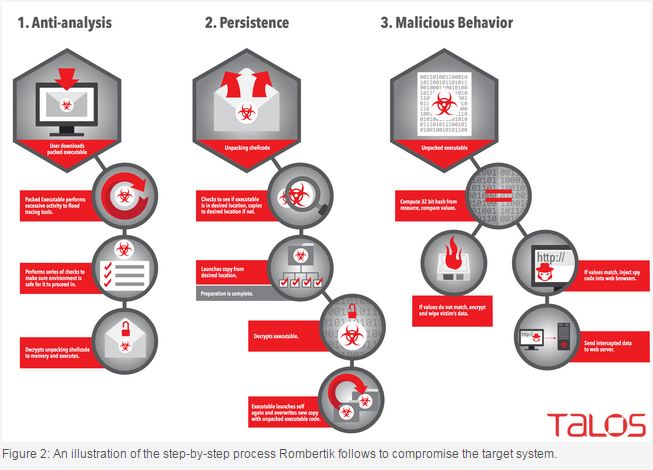
It’s elusive, evasive, and the next evolution of malware. Newly identified by Cisco researchers, “Rombertik” doesn’t just self-destruct when it finds tools that can detect it. Instead, if tries to destroy the Master Boot Record (MBR) of the machine it’s on, which is destructive because when the machine restarts, it will be inoperable. The MBR is critical to system operation, and is the first sector of a hard drive, where all the initial instructions are at boot up, letting the computer know to load the operating system.

This is an example of complex malware, hard to detect, and to protect against. Its purpose is to gain access to the target’s browser, read credentials and pilfer other sensitive information which it then collects to send off to a remote server. Rombertik spreads via spam and phishing emails. Here’s how it works:
Once loaded into the system, Rombertik first runs a series of anti-analysis checks to determine if it is running within a sandbox. In case it isn’t running within the sandbox, Rombertik decrypts and installs itself on the victim’s machine, which then allows the malware to launch a second copy of itself and overwrite the second copy with the malware’s core spying functionality. After completing this process and before begins spying on users, Rombertik runs a final check to make sure it is not being analyzed in memory. In case it finds any indication of being analyzed, the spyware attempts to destroy the master boot record (MBR) of the vulnerable computer. Rombertik then restarts the machine, and because now the MBR is missing from the hard drive, the victim’s computer will go into an endless restart loop.
The best defence in this situation is a layered defence, because Rombertik won’t be able to evade all the layers.
- http://blogs.cisco.com/security/talos/rombertik
- http://www.scmagazine.com/cisco-writes-up-new-malware-campaign/article/413068/
- http://thehackernews.com/2015/05/malware-destroy-hard-drive.html
Macro Malware’s Re-Emergence. Be Aware. Be Very Aware
Remember that saying “Everything old is new again”? That’s a trend in InfoSec. It’s not at all uncommon for threats to re-emerge after seeming cease, because attackers have taken the time to revisit and retool. Think of it as a more damaging version of reduce, reuse, recycle. What happens is that the malware gets onto computers via spam email attachments. When the user opens the document, they are prompted by a bar along the top asking if they wish to enable macros to read the item. Most people click willingly, enabling the macro and the malware. The malware then becomes a portal for even nastier stuff waiting in the wings, like the banking Trojan, Dridex, which hunt down and collect valuable personal and financial information. Once again, the onus is on the end user to be aware of what they open and click, but that isn’t always an easy judgement call as these emails look very convincing. Currently, most attacks are happening within the US and the UK.
http://www.infosecurity-magazine.com/news/macro-malware-returns-with-a/#.VUbXOQefKP9.twitter
WordPress XSS Vulnerability on Default Site
The twenty fifteen site can be hijacked. The vuln exists in the default installation of Twenty Fifteen Resides in the genericons pkg and is DOM-based or (document object model) which handles how text, images, headers and links are represented in a browser. Target clicks a malicious link while logged into the site, enabling attacker to gain control. Many hosts have patched the security hole as of today.
But wait – there’s more! The vulnerability exists in eShop, a shopping cart plugin for the content management system with 10,000 active installs and over 600,000 downloads. BUT eShop has not been updated in almost two years.
The risk is insufficient validation. “The cookie’s user-supplied input could be exploited by an attacker to overwrite arbitrary PHP variables, which could lead to full path disclosure and cross-site scripting.”
Genericons is an icon package that figures into the Jetpack plugin and the TwentyFifteen WordPress theme. It is at risk from a DOM-based Cross-Site Scripting (XSS) vulnerability. Jetpack has over a million installs to date. TwentyFifteen is a popular theme and loaded by default in most WordPress installs.
“What’s more concerning here is the reach the plugin and theme have combined; they are installed in many cases, by default in all WordPress installations,”
This was according to David Dede, the malware researcher at Sucuri, who discovered the issue and disclosed it. Nearly a dozen WordPress hosts – GoDaddy, WPEngine, and Pagely to name a few – preemptively patched the issue in the week’s leading up to Sucuri’s disclosure. Your best bet now is to keep all WordPress up to date.
- https://threatpost.com/vulnerabilities-identified-in-two-wordpress-plugins/112676
- http://arstechnica.com/security/2015/05/actively-exploited-wordpress-bug-puts-millions-of-sites-at-risk/
- http://www.tripwire.com/state-of-security/security-data-protection/wordpress-xss/?utm_source=Cluley&utm_campaign=7746d3c914-Graham_Cluley&utm_medium=email&utm_term=0_8106850f4a-7746d3c914-62365541
New Ransomware: AlphaCrypt
It looks like TeslaCrypt. It behaves like CryptoWall. Like Dr.Frankenstein played with the code. But this new version comes with new features – it deletes the VSS so your shadow volume is gone. You don’t have that backup protection in place. And it operates in a very covert manner so that you won’t find out until it’s much too late. No messages are shown to the victim as the processes execute. Being delivered via an Angler exploit kit near you.
http://www.net-security.org/malware_news.php?id=3033
How Dyre Malware Continues to Evolve
While this is considered a common banking Trojan, what matters here is how this is malware is evolving to evade analysis done by sandboxing. That means that conventional methods and signatures are no longer effective or reliable. Evasion techniques have become better and more prolific over a short span – less than a year – for malware. Upatre malware often works in concert with Dyre and this too has enhanced its evasion techniques.
http://www.seculert.com/blog/2015/04/new-dyre-version-evades-sandboxes.html
Torrent and the Fiesta Exploit Kit
This impacts a popular torrent site for music and movies. Despite aggressive ads and popups, people still flock to it. SubTorrents.com. When a target browses the site, a malicious redirection silently loads the Fiesta exploit kit and associated malware payload. Users with anti-malware/VP are shielded. The site itself is compromised via a well-concealed iframe.
More Lenovo Woes
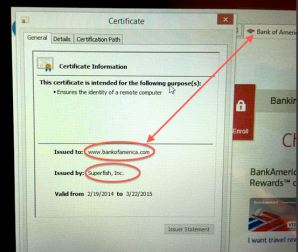
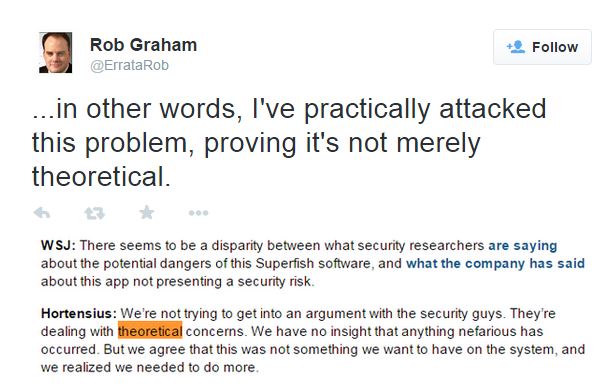
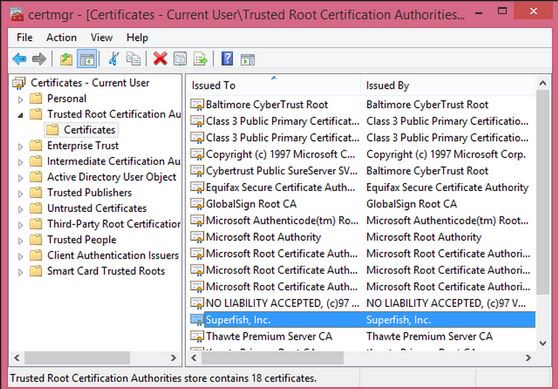
Again lax security practices. This time it’s a way that attackers could bypasss signature validation checks and replaced trusted apps with malicious ones. These could then be run as a privileged user. System update downloads executables from the internet and runs them. Remote attackers can use a MiTM attack, via Starbuck WiFi, and exploit this. Lenovo claims they have patched, but after the Superfish crapware from February, how much do we trust them?
http://www.theregister.co.uk/2015/05/06/lenovo_system_update/
So Long Patch Tuesday
Yes. It’s official. Microsoft will be doing security updates and releases differently with the release of Windows 10. Which, incidentally, needs it’s own name.
http://www.theregister.co.uk/2015/05/04/microsoft_windows_10_updates/
Venom
We’ve had some big security issues over the past year. But Venom isn’t going to be one of them, despite the name. Sometimes, it’s easy to get carried away by the hype and hyperbole. If we’re doing our job right, though, rather than scaring you we’re preparing you.
This latest vulnerability, classified as CVE-2015-3456, is a problem in the floppy drive emulation code found on many virtualization platforms. What that means is if an attacker were able to, by considerable effort, escape the Guest OS, they could use the host to launch other network attacks. Essentially, an administrator account would have to be compromised for this to happen. Only certain platforms are impacted and they have patches currently available. Major VMs that are not impacted include:
- VMware
- Microsoft Hyper-V
- Bochs
- AWS
- Linode
- http://www.csoonline.com/article/2922066/vulnerabilities/venom-hype-and-pre-planned-marketing-campaign-panned-by-experts.html?utm_source=twitterfeed&utm_medium=twitter
- http://venom.crowdstrike.com/
WordPress Sites Backdoored
Another week, another WordPress security issue. According to Zscaler, this time multiple WordPress sites are leaking credentials. Compromised sites are implanted with a “Backdoor” code that serves up injected JAVA script when the user enters their credentials on the login page. The end user remains oblivious as they are redirected to a successful logged in session of a WordPress site. Meanwhile, those valuable credentials are encoded and sent to off to the attacker’s command and control server. The recommendation from the ZScaler security research report is what we’ve been saying consistently:
“It is extremely important for the site administrators to keep their WordPress sites patched with the latest security updates,”
- http://research.zscaler.com/2015/05/compromised-wordpress-sites-leaking.html
- https://threatpost.com/wordpress-sites-backdoored-leaking-credentials/112703
PHP Hash Comparison Flaw May Put Many Sites at Risk
About a year ago, a flaw in PHP password hashes was identified involving the equals-equals operator (==). Robert Hansen, vice president of WhiteHat Security, describes the issue as “one that affects any website that uses two specific types of operators for comparing hashes in PHP.” The issue mostly affects authentication, but this could extend to binary checking, cookies, and passwords, among other things.
“The problem is how PHP handles hashed strings when either the double equal (==) or “!=” operators are used to compare them. When either of these two operators is used for comparing hashes, PHP interprets any hashed value beginning with ‘0e’ as having the value 0. So if two different passwords are hashed and both their hashed values begin with ‘0e’ followed by numerals, PHP will interpret both as having the value 0. Even though the hash values for both passwords are completely different, PHP would treat them both as the number zero if both begin with 0e and when either ‘==’ or ‘!=’ are used.”
This gives attackers a way to try and compromise user accounts by entering a string that when hashed gets equated to zero by PHP. If a password in the database is represented the same way, the attacker will get access to the account, Hansen said. Until now, there haven’t been examples of these hash types.
- https://blog.whitehatsec.com/magic-hashes/
- http://www.darkreading.com/vulnerabilities—threats/php-hash-comparison-weakness-a-threat-to-websites-researcher-says-/d/d-id/1320353?_mc=RSS_DR_EDT
- http://securityaffairs.co/wordpress/36732/hacking/php-hash-comparison-flaw.html
GPU Keylogger and Linux Rootkit attacks
Malware just keeps evolving. This time it’s targeting the GPU over the CPU with 2 new items: Jellyfish Rootkit for Linux and Demon Keylogger. The GPU, graphics processor unit, has its own processor and memory. That allows the malware to operate incognito, attracting no attention since malicious code isn’t modifying processes in the main operating system kernel. The danger becomes that these types of rootkits can snoop on the CPU host memory via the direct memory access (DMA). This allows hardware components to read the main system memory without going thru the CPU so actions are harder to catch.
Some attacker advantages with GPU are:
- No GPU malware analysis tools are available on the Internet
- Can snoop on CPU host memory via DMA (direct memory access)
- GPU can be used for fast/swift mathematical calculations like parsing or XORing
- Stubs
- Malicious memory is still inside GPU after device shutdown
For reference purposes, a GPU-based keystroke logger consists of two main components:
- A CPU-based component that is executed once, during the bootstrap phase, with the task of locating the address of the keyboard buffer in main memory
- A GPU-based component that monitors, via DMA, the keyboard buffer, and records all keystroke events
http://thehackernews.com/2015/05/gpu-rootkit-linux-Keylogger.html
Breaking Bad Themed Crypto Ransomware
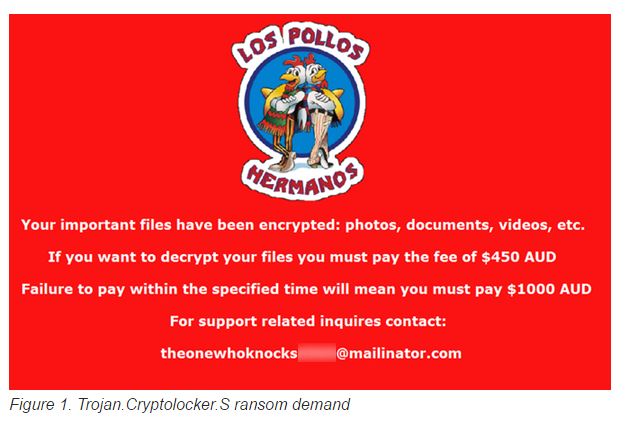
This latest ransomware, Trojan.Cryptolocker.S, is currently going after computers running Windows based systems in Australia. The attackers leverage social engineering methods to get victims to open a malicious zip archive file, apparently with a major courier firm in the file name. Attackers then can run their own PowerShell script on the computer to run the ransomware. Encryption uses a random AES key, which is then encrypted with an RSA public key. Targetted files for encryption include media files, music, images, .lnk and .rar extensions.

Symantec has a blog post about how to stay protected if you get ransomware here.
You know that Flashlight App you have?
Time to shed a little light on a dark matter. The top 10 Android flashlight apps are actually malware designed to steal your data off your mobile device.
https://www.youtube.com/watch?v=Q8xz8xKEFvU
SOHO Router Woes Persist
There seems to be an ongoing inherent risk with these devices. This time the vulnerability is in the NetUSB software. This component – found on nearly all common commercial routers like Netgear, TP Link, TrendNet etc – enables users to directly connect their printers, flash drives and other USB enabled items. But because these devices don’t have sufficient input validation an attacker can overflow the “computer name” kernel stack buffer. That causes memory corruption, which can then be exploited for arbitrary remote code execution. By specifying a name longer than 64 characters, the stack buffer overflows when the computer name is received. Though modem companies have been advised, to date only TPLink has issued fixes.
Scam Artists and What Not to Fall For
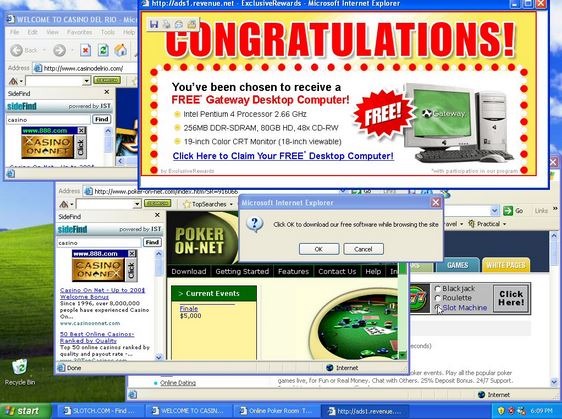
By now, we’ve all heard about the “Windows is Calling” setup. But, people are still falling victim to these bogus scareware schemes. Users cannot help but respond to the alarming popup boxes on screen that say their computer is infected. Now these attacks have become more sophisticated. Even brand new PCs have warnings about “Windows Event Logs”. Most users have no idea what that means, but it sound serious, doesn’t it? In other scams the browser becomes locked, making the supposed situation appear even more dire to the user. And now MAC warnings have entered the fray. Since many of these occurrences are browser-based, a good precaution is to have a backup browser set up to use in case your main one gets locked up by these scammers. And be alert for the latest scheme, which includes a bogus internet service provider or ISP advising users they have become part of a “BotNet”, but that by paying a fee to the “ISP”, the user can be released. Yes, BotNets are real, but not in this case. We know better and now – so do you! Stay safe.
Silly Putty or Trojan PuTTY
A malicious version of this popular tool is currently in circulation. Users who download it need to be mindful of where they download from, and to check the About Info stats to confirm it’s friendly.
http://www.net-security.org/malware_news.php?id=3041
End Users, Attitudes and Security Issues
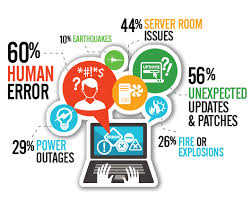
Technology offers amazing productivity and solutions when used right, but it doesn’t govern itself. Even the best intrusion detection and prevention systems cannot adequately account for the “human factor”. Recent research shows that:
- 82% of US employees know that opening emails from unverified sources is risky and 17% still do it
- 72% know using a new app without IT sign-off is wrong but 28% still do it
- 22% download apps from outside Apple APP store or Google Play, and we know stuff in there isn’t all kosher
According to Hugh Thompson, CTO and senior vice president, Blue Coat Security,
“This is not a problem we can educate our way out of … We need to change training awareness around actions and how awareness is linked to action … Security solutions need to facilitate employees’ work seamlessly.”
Bottom line: All the king’s horses and all the kings men can’t fix what goes wrong when Humpty decides to do as he pleases.
- http://www.scmagazine.com/blue-coat-system-conducts-security-survey/article/415611/
- http://lifehacker.com/stop-expecting-privacy-when-you-use-work-apps-1705253544
Vulnerability in Safari Allows Attackers to Spoof websites
Safari can be forced into loading one page while still displaying the URL of another page. The bug works on fully patched version of iOS and OSX. Users who are not aware of this risk could be redirected to a malicious site where they then get infected with malware or their credentials are stolen.
Moose on the Loose
ESET researchers have identified a new worm infecting routers. It can be used toward social networking fraud, hijacking victim’s internet connection to “like” items, “view” videos, “follow” account. While this may not look dire, the manipulation of social media is a growing trend. This can lead to DDos attacks, DNS \hijacking, etc. Linux/Moose infects Linux based routers and other Linux based devices. It takes advantage of weak configurations and poorly chosen login credentials (What can I say?) So there is collateral damage to other devices connected to these routers. Including things like … drug pumps. All the common commercial names like TP Link, ZyXEL, Netgear etc are factored in. EXET has a detailed technical report including methods users can apply to determine if they are compromised and cleaning instructions.
- http://www.welivesecurity.com/2015/05/26/moose-router-worm/
- http://www.welivesecurity.com/2015/05/26/dissecting-linuxmoose/?utm_content=buffer975d8&utm_medium=social&utm_source=twitter.com&utm_campaign=buffer
Android Factory reset doesn’t wipe data completely.
That means user data including SMS, photos, and videos, could be recovered. Even encryption keys and master tokens for Google and Facebook were recovered in 80% of the cases. 500 million devices “may not properly sanitize their data partition where credentials and other sensitive data are stored and up to 630 million may not properly sanitize the internal SD card where multimedia files are generally saved.”
http://securityaffairs.co/wordpress/37065/hacking/android-factory-reset-flaw.html
Fake FBI Ransomware
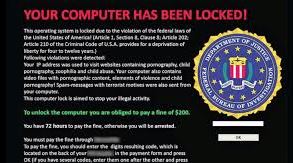
This one comes via Android and poses as an Adobe Flash Player update – oh how we love Adobe! Once active it announces itself via an FBI warning screen. It even includes screenshots of “questionable” browsing history and orders victim to pay up. This variant is the Android Trojan SLocker-DZ, one of the most prevalent android ransomware families with regular new variants. It does not encrypt the contents of compromised smartphones but renders the devices home screen button and back functionalities useless. Shutting down the device doesn’t work because the malware runs when the OS boots.
http://www.theregister.co.uk/2015/05/26/android_ransomware_mobile_scam_fbi/
Evolution of New POS Malware
It’s hard to swipe a card these days and not winge. This week brings us “Nitlove”, a macro-based malware designed to steal card data from Windows PoS systems via spam emails. When the clerks check their emails on the terminals – and of course they do – they will encounter an unsolicited email from a spoofed Yahoo mail account referencing job opportunities with a CV attachment. That is where they’ve embedded the malicious macro.
According to FireEye, the malware copies itself to the disk using NTFS alternate data streams (ADS) so the files won’t be visible right away. Then it monitors and respawns if there are attempts to delete it. It will then scrape track one and track two card data, save and send it off to the C&C server in Mother Russia. Via SSL. Apparently, those security issues aren’t a concern for them.
CHIP and PIN technology used in Canada and Europe really safeguards users against this risk, but the USA is still struggling to make it happen there.
- http://www.pcworld.com/article/2926352/attackers-use-email-spam-to-infect-pointofsale-terminals-with-new-malware.html?utm_source=dlvr.it&utm_medium=twitter#tk.rss_all
- http://www.infosecurity-magazine.com/news/hackers-spam-out-new-nitlove-pos/?utm_content=buffer1dc89&utm_medium=social&utm_source=twitter.com&utm_campaign=buffer











 CyberWatch