Unknown's avatar

About Cheryl Biswas

Writer, reader, techie, Trekkie. InfoSec and political analyst. Keeping our world safe one byte at a time.

Attribution: A Word to the Wise

sony2It has been one month since the hack attack on Sony.  Thirty days rife with speculation, hype and hyperbole that threw the press into a feeding frenzy.  In early days it seemed temptingly easy to believe the attack was in retaliation by North Korea for an American comedy that showed their beloved dictator, Kim Jong Un, being executed.  North Korea made an excellent villain as the story played out, and the extent of the damage done to Sony was revealed.  For most people, the information as presented in the media made the decision for them: North Korea was behind the attack. But after reading a particularly relevant  blog post by Misguided Security (http://misguidedsecurity.blogspot.ca/2014/12/doing-un-walk.html), I realized I needed to carry the message forward:  not everyone is getting all the details on the Sony hack, and that is as damaging as the hack itself.

Let me admit my guilt here and now. I did believe that North Korea was behind the attack, setting the tone for one of my earlier blog posts.  While I still consider them an InfoSec menace, I’ve read and considered what other wiser, more informed minds had to say.  I’m very glad I did because now, in the true spirit of this blog, I can share what I have learned.

theinterview-640x236From the outset there were many within the InfoSec community who declared that there wasn’t enough proof that it could be North Korea.  Over the past few weeks, that chorus of voices has steadily grown, and consistently put forth solid reasons to back their arguments, all the time asking for definitive proof to back the allegations that it was North Korea.  It was a fair and rational stance, taken by a group of people who are dedicated to and experts on Information security.  More interested in promoting the truth than themselves, they put their reputations on the line to publicly dispute the assertions made by the FBI and high-profile press pundits.

These are people whose opinions I respect and trust, for good reason. They have years of experience tracking malware and real cyber threats.  As events unfolded and  coverage mushroomed, the CEO  of TrustedSec  showed the need for calmer heads to prevail when he said  “Speculation backed with little facts …we need to be careful…” and then “ We are using some strong words right now and need to back it up without a shadow of a doubt.”  His sentiments were echoed by another cautionary voice in the InfoSec community. “We have to be careful on our rhetoric of war and blame, as these little comments can mean big things.”(Jericho).

sonypictureshack-640x1136

There are now many excellent blogs and posts about the attack on Sony, and they all give compelling reasons why we should think before we jump on any bandwagon, in this case the one that North Korea did it.  The best place to start is with a simple, factual chronology of events.  I like this on-going post, started  Dec. 5 by Risk-Based Security  (https://www.riskbasedsecurity.com/2014/12/a-breakdown-and-analysis-of-the-december-2014-sony-hack/).  It states, for example, how the now-infamous “Passwords” folder likely was created by the hackers, GOP, when they released the files, and not Sony.  But perception is paramount in the blame-game, and unfortunately Sony found itself caught in the unforgiving glare of speculation.  Deflecting negative publicity onto North Korea as the evil perpetrator could help serve as damage control, especially if they were portrayed as a threat to national security. That wasn’t hard to do in the given current global concerns regarding ISIS and the Middle East.

It’s so easy to jump to conclusions, to see what we want to see.  But as the Sony hack has hopefully taught us, we need to take the time to make informed decisions, and especially to listen to those who challenge assumptions with facts.  Throwing around accusations without proof isn’t just foolish, it’s dangerous.  It’s a great way to make a bad situation worse.  When we know certain nation states are capable of irrational and unpredictable behaviour when provoked, levelling accusations requires more care and discernment.  As ‘Jericho’ says, “make sure you are educated about what has happened the last 30 days, and then try to be a voice of reason in this ugly mess.” Because given all I’ve read, attribution can become a weapon, and not necessarily one of choice.

My Top 10 List: So What Did We Learn in 2014

malware3

There is no question that 2014 has been a most eventful year for InfoSec – and that’s not necessarily a good thing.  Data breaches, malware attacks, compromised Point-of-Sales systems, more data breaches. And of course – the Sony hack. A lot of painful lessons have been learned, many at high cost. So as the year draws to a close, let me present my Top 10 List of what I hope we learned from this year of events we wish we could forget.

1. PATCH IT. Patch it good! System software patches are an integral part of keeping your business, and yourself, safe.  Windows, Linux, Adobe, Oracle to name a few, all offer regular patches to cover those vulnerabilities that leave them exposed to hackers looking for a way in. Ideally, you should have a regular ie monthly schedule where patches are checked and updated.  Another thing to remember: test patches before you apply them. Microsoft has had two terrible months in a row issuing then recalling bad patches, but not before inflicting some major headaches on those who already applied them.   http://www.darkreading.com/application-security/time-to-rethink-patching-strategies/a/d-id/1318256?_mc=RSS_DR_EDT&utm_source=dlvr.it&utm_medium=twitter

B5fDUybIUAMF2IG2. THINK before you click that link.  Phishing and malvertising have reached prolific levels, and are designed so well it’s easy for everyone to fall for the bait. The onus is on us to be certain we know and trust the sender before we open attachments or click on links. Visiting popular websites or social media hopping is an open invitation to a nasty case of malware because many of these destinations have now become choice phishing holes. Don’t get lured in.   http://www.esecurityplanet.com/malware/dridex-and-email-a-nasty-social-engineering-team.html

3. Pass on that Password. This is your first and your best defence to secure anything of value.  Here is how to do it right. Ideally a length of 16 characters, with a mix of upper and lower cases, including numbers and special characters. Oh – and take a tip from Sony. Don’t file under “Passwords”. http://www.wired.com/2014/09/dont-get-hacked/?linkId=9521469

4. AntiVirus Protection. There are a range of options, and many good SOHO programs are even free, though I would strongly encourage paying more to invest in additional protection against cyber threats.  And yes – you definitely need to have this on your phone & tablet. Mobile devices are targets of choice. Given how much of our lives we keep on our phones, why would you put that at risk? Finally, don’t rely on out-dated or lapsed programs. In the constantly evolving world of malware and viruses, yesterday’s solutions won’t cut it. Always keep your AV updated.hacking-sony

5. Breach Protocol 101. If you get breached, handle the situation correctly and professionally. Your customers deserve the decency of being informed as soon as possible to protect themselves and take appropriate action. As in the case of Home Depot, don’t make customers wait for the bad news. Because you can’t put a price on trust and reputation. http://www.theglobeandmail.com/report-on-business/international-business/us-business/home-depot-shares-drop-after-chain-investigates-data-breach/article20308768/?cmpid=rss1&click=sf_rob

6. Secure your SOHO tech. Especially routers. Update, upgrade.
http://blog.norsecorp.com/2014/12/18/millions-at-risk-from-misfortune-cookie-soho-router-vulnerability/?utm_content=buffer85c25&utm_medium=social&utm_source=twitter.com&utm_campaign=bufferrouter

7. WiFI Hotspots: Use with extreme caution! In this holiday season of travel and shopping, convenience may be king but letting your guard down isn’t worth it. Secure your tech first – ‘Free’ comes with a price  http://www.onguardonline.gov/articles/0014-tips-using-public-wi-fi-networks

8. Things aren’t so fantastic when you pay in plastic. This year has proven repeatedly that credit cards are not secure. But given that so much our retail and online world run on plastic, what can you do to stay safe? For starters, Always Check Your Statements. Be in charge of your accounts and know everything coming or going. Secondly, cover the keypad when you enter a PIN anywhere.  Because there really are “eyes in the skies” that are waiting for you to enter the magic number.
malware29. You get what you paid for. When you buy pirated software and 3rd party apps, you often get a free gift-with-purchase, but trust me, it’s one you don’t want. Malware, browser hijackers etc. It’s a headache to huntdown and then remove these nuisance products. You’re better off paying for the real deal.  http://www.scmagazine.com/pirated-joomla-wordpress-drupal-themes-and-plugins-contain-cryptophp-backdoor/article/385552/

10. Best for Last. HAVE A PLAN. When it happens – and it will – have a real Disaster Recovery/Business Continuity plan in place.  According to exper Dejan Kosutic, “It is the combination of people and technology that keeps a business running, not computers only, and this is exactly why the concept of business continuity has prevailed in the last couple of years.” According to CISCO, “60% of Canadian businesses either don’t have a security strategy in place, or don’t know if their current one accounts sufficiently for change and evolution to effectively meet threats.” http://www.itworldcanada.com/article/majority-of-canadian-firms-not-prepared-for-cyber-threats-cisco/100226

And on that cheery note, let me wish you all a safe and successful 2015!

What We Should Learn from Sony’s Pain

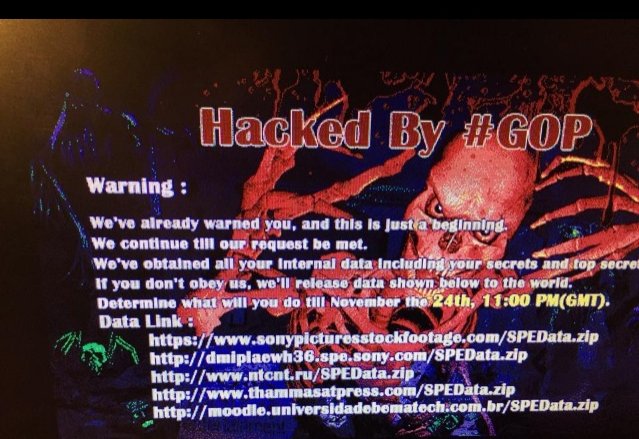
hacking-sonyIt is THE biggest news story. Period. And it will be a story that will live on in the telling because it wasn’t just how it happened, it was why.  The hacker attack two weeks ago on Sony was an unprecedented take-down of a global corporate giant by the Guardians of Peace (GOP), a group of cyber-terrorists operating from a small country across the globe.

By now, we all have heard the allegations against North Korea as being the power behind the hackers. North Korea is highly volatile, an unpredictable player in the current global theatre. That means their actions are more threatening. While there is no definitive proof, the code was written in Korean. Email messages have been sent from the GOP, a hacker group based in North (not South) Korea, demanding Sony take down the film ‘The Interview’ about assassinating leader Kim Jong Un. And then there’s the fact that in North Korea, a country known for austerity and deprivation, hackers are state-sponsored and treated as an elite group.

theinterview-640x236

They clearly have no problems developing a very malicious form of malware that disabled or destroyed equipment. This type of malware may have been used before. “Shamoon” as it was known then hit 30000 computers in 2012 in an attack against the oil company Saudi Aramco, and then again in an attack against South Korea in 2013. Moreover, they were able access and operate within Sony’s systems without detection for a considerable length of time.  Sony is a private corporation, but what if this had been done to a major power supplier, water regulator, or another entity considered part of the critical infrastructure. Cybercrime becomes cyber-terrorism.

The economic costs to Sony will be staggering in terms of loss: equipment, intellectual sonypictureshack-640x1136property, confidential and personal data. Never mind the decimation of employee morale and company reputation. The hackers have been contacting families at Sony, telling them they must take their side or else. The GOP got their timing right, striking just before the Christmas release peak season, and they have brought Sony to its knees.

So what do we take away from this? Back in June, North Korea promised to “mercilessly destroy” anyone associated with the film. Did Sony not see this coming? Whatever they suspected, no provisions appear to have been made. Now, it’s damage control. And here’s the first lesson going forward for us all – as details unfold, they further expose the open wound and that can be more painful than the attack itself. In Sony’s case, it’s been revealed that they kept corporate passwords in a file called ‘Passwords’. Yes, I know. While that in itself didn’t facilitate the attack, it implies that Sony was careless, inviting further unwanted speculation.
password-hackedAnd here is the second hard lesson: regardless of how good a defense companies put up against outside hacks, they’re only as good as their weakest link in the security chain which more often than not is human error. In Sony’s case, that meant the problem could have come from within, as simple as someone unwittingly opening those carefully constructed security doors to let the attackers in. For all that companies train and advise their staff, they cannot control their every move or decision. Malware has become an art form in deception, reflecting the spectrum of human weakness.

My hard look at the bottom line: Sony didn’t know how the GOP would strike, but they knew they were at risk, and who the threat was. If this attack could be attributed to state-sponsored North Korean hackers, then current concerns being expressed for the safety of our critical infrastructure need more than words and firewalls. The onus was on Sony to secure their assets, ensuring what measures they had in place were effective. If due diligence is where we can all fall short, we need to close that door or risk more events like this.

.

A Nasty Case of Krab Web

Computer security concept in word tag cloud on white background

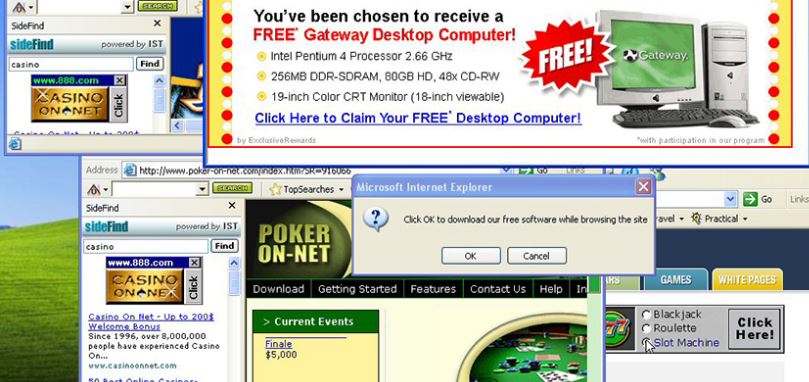
It can happen to anyone. Suddenly, your computer screen is an explosion of pop-ups. You think you’ve clicked close only to have another pop-up take its place.  And then they start opening something you never agreed to. Frantically, you try to shut things down only to discover your cursor has a mind of its own. You try to Google what to do, and keep going to a site you’ve never heard of and don’t want. Welcome to the nightmare of a malware infestation.

MALWARE ATTACK! What Do I Do NOW?

screenfull1

I just spent some quality time cleaning a nasty case of Krab Web malware off a laptop. The user had no idea what the item she downloaded would come bundled with. So, let that be my first helpful lesson to you.  Unless you download directly from the source, you are getting your downloads from third party distributor. The names are common, including biggies like CNET and Softonic.  It isn’t that you can’t trust them.  It’s that even they can’t trust what’s going into the mix.  Your best bet is to forego the default installation choice and choose “custom”.  Because when you just click and agree, a couple pages will zoom past. You may think you agreed to another toolbar but you just signed on the dotted line for a dozen – no, I am so not kidding – a dozen or more annoying and even malicious programs that will take you where you do not want to go.  By this, I mean sites where they are phishing for you and downloadable remote access bogeys lurk. But that is a whole separate posting of pain for another day.

STEP 1: Identify and Destroy

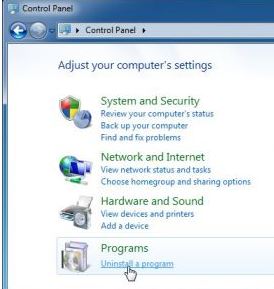
step1Let’s say you are on Windows. Open the Control Panel. Then, select Program and Uninstall.  Try to bear with all the pop-up boxes and not click anything.  Once the list of programs appears, click on the Date column to bring up items most recently added. You should see a list of at least 12 or so from when you did your download.  Some will say “Optimizer”, some will say “Protection”, some will say “Best deals”.  They are all bogus.  You want NONE of them. Start by selecting each one and clicking Uninstall.  You can agree to using the program’s own uninstaller remove it. That’s normal. And the best way to get rid of them.  Here’s what I tossed in the trash:

  • Remote Desktop Access VuuPC\
  • PepperZip
  • Optimizer Pro
  • StormWatch
  • Search Protection
  • My PC Backup
  • Surfkeepit
  • eDeals
  • SPT System Updater Service
  • Word Prozer
  • HQ ProVideo
  • Fast Player

Yes, they may sound legit.  But they all had today’s date stamp, and some of them were particularly nasty malware/adware.  As the song says “Don’t Get Fooled Again!”

STEP 2: Remove Adware using ADWCleaner

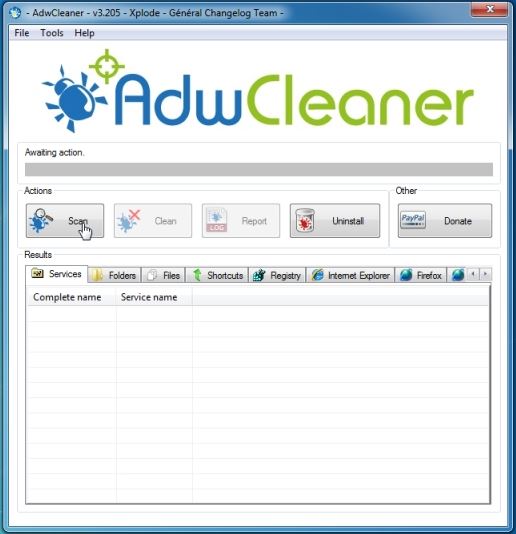
adwYou may be able to access your browser at this point. If you can, go to this site: ADWCLEANER DOWNLOAD LINK to download an effective Adware cleaner.

Follow the instructions and install. Click on the “Scan” button and then click “Clean”.  You’ll have to reboot.


STEP 3: Remove program files with MalwareBytes

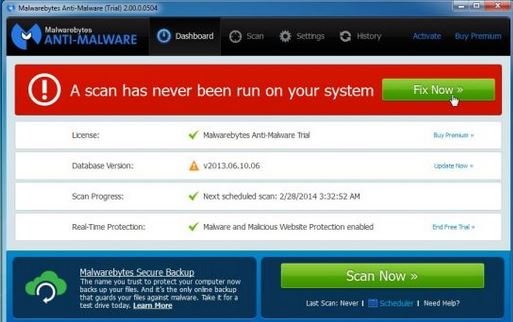
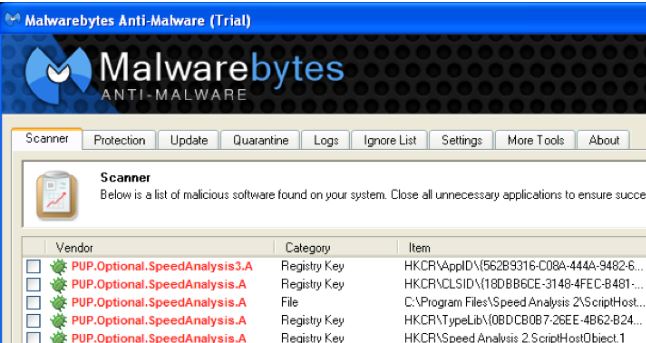
malbytesNow, you  need a program to go after the virus, Krab in this case. Download  MALWAREBYTES ANTI-MALWARE. Follow the prompts and install the free version.


 If prompted, click the green “Fix now” box to start the scan.

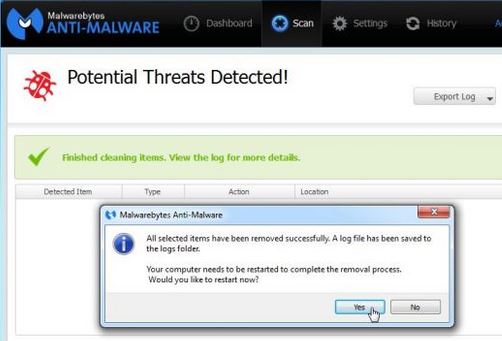
malbyte2You may be prompted to upload updates. Click agree.   The program will scan, you can watch the progress, and when it’s done you’ll be notified.  The dangerous files will be quarantined, and expect to be asked to reboot. Say yes.


STEP 4: Clean your Browsers

google1You will probably notice a delightful lack of pop-ups this time. But you’re not in the clear yet. You need to clean your browsers now.  Follow these steps as outlined.

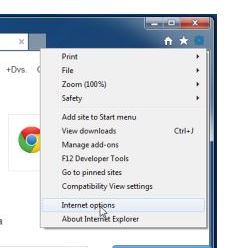
If you use Internet Explorer, click on the right corner gear icon for Settings. From the drop down box, click Internet Options.


google2

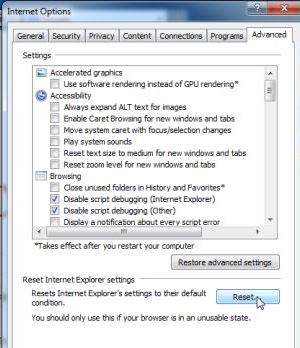
In the next box, click on the “Advanced” tab. Click on the “Reset” button. In the next box, select “Delete Personal Settings” and click “Reset”. When Explorer is finished, click close.


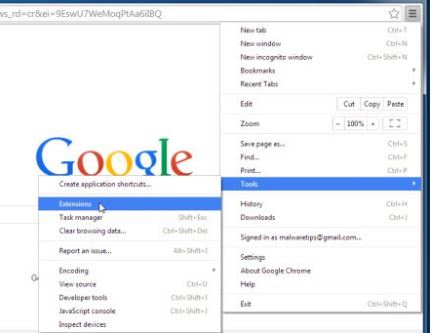
googleFor Google Chrome, click this symbol at the top right: symbol. Then, click on “Tools” and then “Extensions”.


In the Extensions tab, you’ll see Krab Web and other items, some which you don’t recognize. Click on the trash can icon beside those you want to remove. If you didn’t install it, delete it. extensions


STEP 5: Check the Spread

A note of caution: Malware spreads with physical contact so you need to check any other devices you’ve connected to your computer, like USB or flash drives, tablets, or even your phone.  Run a scan using your anti-virus and Malware Bytes.Trust me – you’ll be glad you did. Now you’re clean and protected. Surf safe!

** A big thank you to MalwareTips.com and their helpful site

Creating A Culture of Security

chart

National Cyber Security Alliance

It’s been quite a year for Tech. And I don’t mean Windows8 or iOS8.  We’ve seen a string of data security breaches – Target, Dairy Queen, Home Depot, each one netting more unsuspecting, unprepared victims.  We’ve read about Chinese hackers letting themselves into our national security databases, like the National Research Council in July.  And the world is still trying to patch the leaks on Linux following the discovery of Bashbug, impacting almost all servers that connect us to the internet, while hackers continue to exploit those vulnerabilities with malicious code and malware.

We don’t know what the next juggernaut coming at us from around the curve is going to be. Malware, data breach, system hack. Or worse. What we do know, based on recent events, is just how unprepared we are for something bigger. There’s a lot of finger-pointing going on, because it’s easy to resort to the blame game. Nobody wants to be held responsible for a disaster.  Especially not when a class-action law suit is likely to follow.  The costs of clean up are staggering. As are the costs of damage done and customers lost.  By all accounts, this is the road that should be less travelled. So how do we make that the case? How do we stop playing catch-up and get out in front of what comes next?

banner_general (1)

One:  we need to rethink the whole concept of security in our interconnected world. Corporate Security Officers and Chief Information Officers have a vital role to play in bringing together all levels of their organizations to support and follow security procedures. We can’t keep paying lip service. We need to create a culture of security from within, working together on a common goal to effectively put up a united front. While that is the objective, a chain is only as strong as its weakest link. Which leads to the next point.

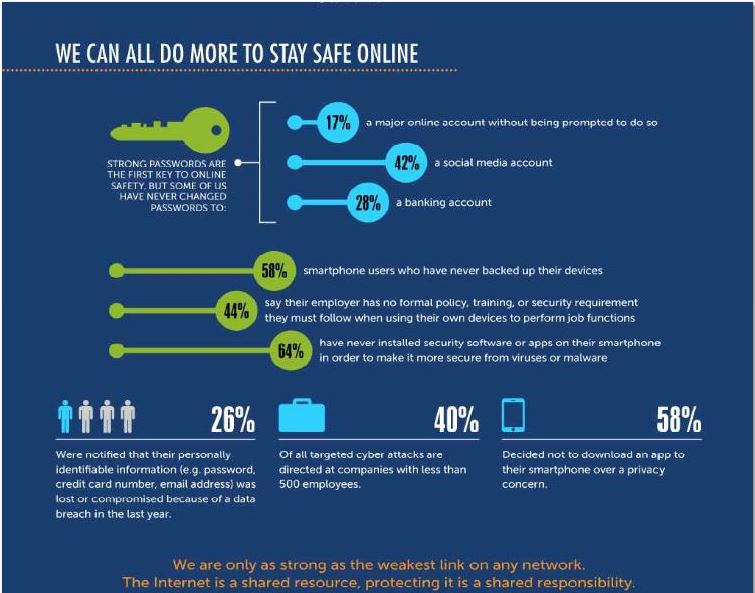
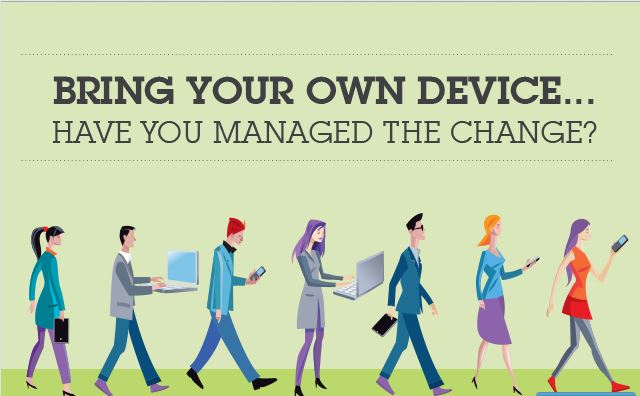
byodTwo: everyone has a role to play in managing security, and it starts with managing our own. Maybe you’ve heard the term “BYOD”? It means “Bring Your Own Device”, an increasing practice by employees in business. Laptops, mobile phones, tablets, flash drives. Portable data is how we live. It’s become how we do business.  All this extra tech finds its way into offices every day. But businesses do not secure personal devices. For the most part, they can’t track them.  The onus is on us as the owners of personal tech to ensure that we have installed adequate levels of virus and malware protection on our devices, and that we consistently perform regular security updates.  As well as following safe practices online so we don’t get phished or download more than we bargained for. If we’re going to bring our devices into work, then we risk exposing all our co-workers, and the safety and integrity of our business, to whatever we do with those devices.   That ounce of prevention we take as individuals really adds up because it’s a massive, costly undertaking to upgrade and repair systems in major organizations. Worse, any changes can take a long time to go through the approval process.  And during a disaster, that is time nobody has.

hackedThree: there is no absolute guarantee of protection. While we expect businesses and organizations to safeguard data and customers, it isn’t realistic. Human error and human fallibility will override whatever measures we put in place. Hackers work around the clock breaking through all the defensive measures currently in place, finding vulnerabilities we didn’t even know existed.  Every mistake we make, like carelessly downloading files or not using antivirus software, gives them the advantage over us and believe me when I say they are watching and waiting for those mistakes. When we commit to our shared responsibility in maintaining our defenses, we commit to building a culture of security from within.

I’m not wearing rose-coloured glasses about how easy this will be. Effecting change is hard, and cultural change is the hardest process. However, we are falling behind in the war on cybercrime, and time is a luxury we soon won’t have.  Cyber espionage is already far more sophisticated and damaging than ever, and cyber warfare may bring a fight to our door that we are not prepared to win. There are a lot of very talented people watching our backdoor, who are telling governments and businesses what they don’t want to hear. We need to listen to those voices, heed their warnings, and start taking action now. Because what we do now will most definitely determine the outcome of what happens next.

Resources: http://www.pcworld.com/article/2825032/linux-botnet-mayhem-spreads-through-shellshock-exploits.html
http://www.cio.com/article/2824268/data-breach/how-to-fend-off-data-breaches.html?utm_campaign=sflow_tweet#tk.rss_all

The Talk You Need to Have With Your Kids

jukim list

Yes, it’s awkward. But the time has come to have “the talk” …  the talk about “dangerous celebrities” and safe surfing with your kids.

We know there are some warped individuals out there whose idea of fun is harmful, and without boundaries.  Celebrity sites have increasingly become the target of hidden malware and online scams. Cybercrime has found a new playground where they hide their poisoned code for unsuspecting visitors, many of whom are kids. Our kids.

malware2

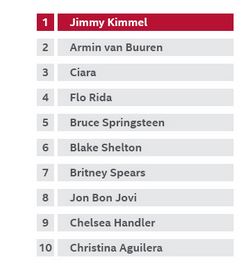
The lure of reading the latest scoop on a big name celeb proves irresistible.  Our kids think they’re visiting a site with pics and details about someone currently popular, someone all their friends will be talking about.  Right now, Jimmy Kimmel is at the top of the hit list with chances being one in five that a website linked to him will be laced with a nasty gift that will keep on giving: spyware, phishing, spam, adware, viruses etc.  One quick click is all it takes.

There is no turning back the clock on technology.  Our kids live in the same online, interconnected world that we do.  Protecting them means shielding them from harm but not from the truth. Not only do we need to become more aware and vigilant, but we need to teach kids the same skills to protect themselves, because we can’t always be with them. And they won’t always tell us where they’re going.

malware

McAfee has some helpful starting points parents can work with on their blog.  These include:

  • Commit to having ‘the talk’: explain how downloads of photos and videos are at high risk of containing bad stuff like viruses
  • Breaking news = red flag: don’t be tempted by the bait of some exciting new celebrity gossip. That’s what cybercriminals are banking on. Literally.
  • Protect your devices and identity: Don’t use any device online without protection. That means installing anti-virus/anti-malware programs on all computers, tablets, phones. Choose what’s right for you and your budget.
  • Stay on the main road: If you want to see something online, use YouTube or Vimeo so you don’t have to download. Because if it says “free download” beware of what else comes with it.
  • Get a sneak peek: when you hover over a link, you can see the URL appear. If the name in the URL is just a bunch of gibberish, or spelled incorrectly, walk away
  • Don’t log in or provide personal information: have a standing rule that kids ask before they open any attachment or link.  Because that click can lead straight to the lion’s den.
  • Put a PIN on it: teach your kids how to set up and use passcodes, and make sure you know what they are.

mcafee blogYou can click on the link here to read more. http://blogs.mcafee.com/consumer/dangerous-celeb.

The old saying “an ounce of prevention is worth a pound of cure” takes on new meaning when you think of just how much we love our kids, and how far we would go to protect them. Their safety is everything. While we may wait to have that “other talk”, don’t put this one off.

#Shell shocked? What You Need to Know about the #Bashbug

 us cert

I’ve been known to exaggerate but trust me when I say that this latest security threat is so big it’s off the charts. Literally. It was rated as a 10 out of 10 by the National Vulnerability Database. A an official advisory was issued by the Department of Homeland Security, and they don’t just hand those out freely. While this won’t ruin your life the way getting caught in a Home Depot style data breach could, it puts at risk almost every device that connects to the internet. Since our world has become the Internet of Things (see previous post for neat-o chart), that means a lot of risk. So here is what you need to know, and why.

iot

Bash stands for Bourne-Again Shell, a very common program used to run line commands in operating systems like Linux, Unix, Mac OS X.  The shell is where we interface with or control the operating systems, and these run pretty much everything we connect to or rely on for connectivity and our “smart” devices. Per trend Micro, “Linux powers over half the servers on the Internet, Android phones and the majority of devices in the IoT (Internet of things).”

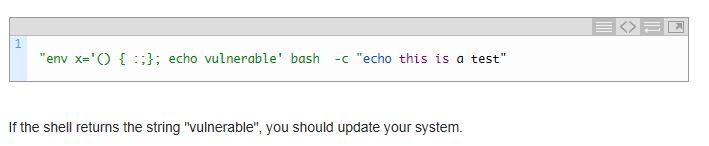
bash vulnerable

The problem is a vulnerability that lets an attacker easily access and make changes to the CGI script written in Bash, those commands that are issued to the operating system. And no credentials are required. As security experts Kaspersky put it “This vulnerability is unique, because it’s extremely easy to exploit and the impact is incredibly severe.” This doesn’t just impact servers. It impacts devices connecting to these servers through the internet: wireless access points, routers, smart fridges, video cams, webcams, even light bulbs. You can patch a server. It’s not so easy to patch a fridge.

fridge

 And this is where the other shoe drops. In his article for Fast Company, Chris Gayomali explains how this vulnerability “also affects Bash versions stretching back at least 25 years, meaning, when or if a patch rolls out, there are a number of older electronics that won’t be getting a firmware update.” The obvious solution has been to issue patches, but the issue is if and when everything affected will have patches available. The problem may have the worst impact on major institutions, like banks and hospitals, where change happens slowly and systems have been laboriously put together over time. According to Patrick Thomas, a security consultant at Neophasis labs, “their most venerable systems are also their most vulnerable.”

So what do we do, now that we know? Systems experts are testing for and patching webservers as I write this. Hopefully, our Internet service providers have been successful. As have those companies who host our websites. Here is some excellent advice from Mark Nunnikhoven at Trend Micro:
1. End users should watch for patch updates or alerts for their Android phones, Macs, or other devices.
2. As a customer of a hosted service, like a website, contact the host directly and ask them if they have patched the vulnerability. If not, why not?

For those running a system that uses Linux, or an Apache webserver, this article by Kaspersky Labs recommends updating Bash and outlines helpful ways to test for the vulnerability: http://securelist.com/blog/research/66673/bash-cve-2014-6271-vulnerability-qa-2/.

kaspersky

Truth is, there’s really not a lot you can do to fix the #bashbug. But you can find ways to stay informed, ask questions (from service providers or friendly folks like me), and follow the practical advice in my earlier posts about protecting yourself. And that is how you can be your best defence against an unexpected offence like this. Welcome to Fortress Security.

What Being “Plugged In” Really Looks Like

There are times when a picture is worth a thousand words. Right now, there’s a buzz-phrase going around big-time: The Internet of Things. Why? Because we keep building devices, large and small, that speak to each other using the Internet: phones, printers, fridges, televisions, cars, game systems, thermostats. To name but a few. This terrific diagram explains how our growing world of connections works, and shows what matters to you, the user. Makes sense now, doesn’t it? And with that understanding comes knowledge, your proverbial ounce of prevention. Because malware shouldn’t come free with any purchase.

My thanks to the clever folks at TrendMicro for sharing.
Layers and Protocols: Possible Attacks on Internet of Everything

IOS8 – What You Should Know Before You Update

ios8

You’re excited. It’s finally here. And like opening a shiny new present you can’t wait to install it. STOP! This is fortress security, where we don’t rush headlong into disaster, and you don’t either.

First – backup your device. Never make any changes to your tech without having a recent backup first. Because stuff happens, and it always happens when you didn’t take a backup. Consider it your insurance policy. If you haven’t done one yet, there’s no time like the present. Given how many people say their lives are in their phones, that’s reason enough. Don’t rely on the cloud, but do a tangible, retrievable backup to a computer and save it to iTunes. Move off some photos, videos, anything to ensure you have 1.4 GB of empty storage space. The upgrade isn’t for everyone. iPhone 4 and original iPads are too old.  Still eligible are 4S, 5, 5C, 5S, iPads 2, 3, 4 , Air and Mini. Allow between 30 minutes to an hour for the upgrade to complete and don’t expect to use your phone during that time. And then, the fun begins.

Expect to find lots of little changes to the old familiar: App store, iTunes store, multi-tasking and Spotlight. New are privacy controls and the iCloud keychain, a security feature for passwords etc. The new Apple Pay feature won’t be offered until October, and this is only for iPhone 6 and 6plus.

The iOS 8 Keyboard:  it’s predictive, which takes some getting used to but is helpful. And a whole new host of Emoji. Plus it supports third-party keyboards that allow for swipe-typing. Crazy as it looks, it works! I know, I use it.

Safari has a credit card reading feature in iOS8 so that you can scan your cards and have the information put directly onto the website page.  I’m not ready to recommend that yet, given the recent surge of security and data breaches, and knowing Apple products have fallen victim to targeted malware attacks and email schemes to lure users.

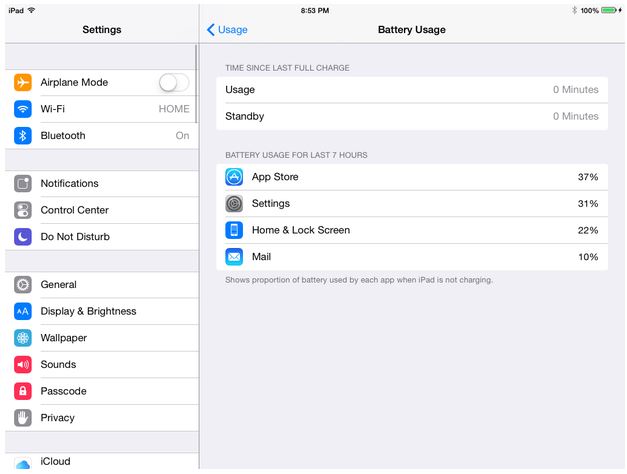
I do like, however, that a new feature lets you track apps that are battery hogs.  Just follow these steps:

  1. Open Settings
  2. Navigate to General | Usage | Battery Usage

After a few moments, the Battery Usage section will appear, and display those apps using the most power.

battery

You may like that in the Photos App, you can view only those videos you shot, which are stored in their own album. Want some of those photos to briefly disappear? You can now tap and hold until a menu appears, then select Hide.

Find My iPhone: Send last location before battery dies. Find my iPhone/iPad/iPod Touch now can send the last known location from your device to iCloud before the battery dies. We know what that’s like. Here’s how to set things up:

  1. Open Settings
  2. Tap iCloud | Find my [device type]
  3. Turn on the option for Send Last Location

Note that if you use WiFi and aren’t near an access point, this may not be able to work.

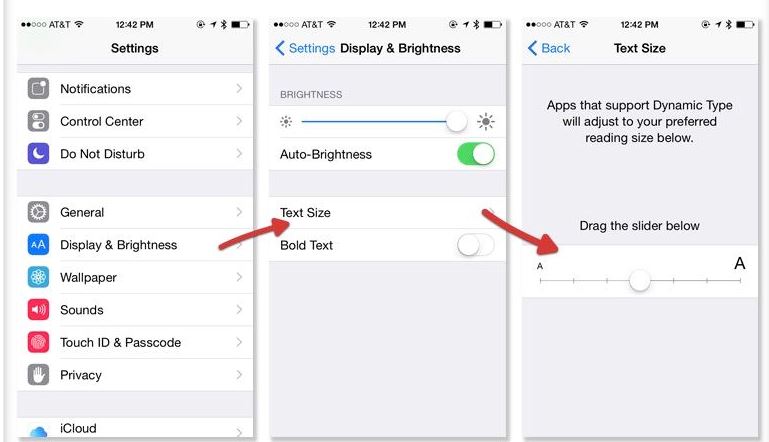
And finally, font size. When iOS 7 came out, it came with the option to change font size throughout the system.  But it was hard to find. Here is how to find the setting in iOS 8:

font

Hopefully this gets you up and running, so you can start enjoying all the new features. Because technology should be fun and friendly. Just like me!


Putting a Price Tag on Trust: The Home Depot Data Breach

homedepot

In a year of huge data breaches, The Home Depot security breach is proving to be the biggest yet. Upwards of 60 million users in both Canada and the United States could be affected. Yet, Home Depot took too long to officially confirm the news once the story broke, and when they did, the damage was already done. Now, they are facing a lawsuit which will become precedent-setting because how do you put a price tag on trust?

Welcome to the pitfalls of retail responsibility in the age of data insecurity. No matter how businesses may try to spin them, data breaches mean trouble somewhere down the line, and given the money to be made they aren’t going away. Cybercrime is booming beyond anyone’s expectations. Hackers halfway around the globe are constantly upping the game in their quest for information to sell on the black market. That information happens to be a digital summation of our lives: where we live, what we’re worth, who we are. Those little plastic cards that run our lives can also ruin them in one stroke.

The technical details of how cybercriminals lift card numbers, usercodes, and passwords have been well documented over the past year. Infact, the US Department of Homeland Security issued a security advisory in late August warning businesses of the threat of Point of Sale or POS malware, in particular one called “Backoff”  that stole information from credit cards (http://t.co/WiOpgp6c6M). It all comes down to a little piece of equipment we use every day. POS card readers are where we shop, eat, buy gas, withdraw money. And the scary truth is how easily they are tampered with. Crime rings buy or extort their way into fixing the actual hardware to mine data. Cybercriminals have figured out a less obvious route using remote access to command and control the devices so they transmit the data without detection. It’s enough to make anyone paranoid.

pii

Instead of being scared into action, however, businesses seem to have pulled the ostrich hiding its head routine, hoping it would all go away.  But it hasn’t gone away, and the lag time has only afforded the hackers more time to perfect their skills while we struggle to catch up.  A full week passed before The Home Depot officially confirmed the real extent of the breach. The scope of those potentially caught in the net of hackers is still being determined, with 60 million users a conservative estimate.

So just how do you tell 60 million users that their credit card data and other valuable personal information has just been released to the global criminal black market? There is no good way to spin that much bad news, not following recent announcements that Target, UPS, Supervalu Grocery stores,several major US banks, and Dairy Queen had also been breached. Brian Krebs had revealed the hack attack on Target.  On September 2, he broke the news on his website, KrebsOnSecurity, that “a massive batch of stolen credit and debit card information went on sale.” At the outset of the data breach, Home Depot shared dropped. Per an article in The Globe and Mail (trib.al/e8RZclg) , shares in trading fell 3.4%. Now, they face a class-action lawsuit.

The reported costs of a data breach vary, but according to Alcott HR Group, is starts at $5 million for one incident, and another source claims that has now doubled.  But the real loss is in what we cannot truly measure, and that is the very heart of retail business. How do you put a price tag trust, consumer confidence and lost customers?  Taking responsibility for your POS devices means taking the necessary actions to safeguard your customers. The rest of retail is about to learn an invaluable lesson at Home Depot’s considerable expense.