Embracing the Shadow – wait! What?

Let me share a few more thoughts about Shadow IT with you as we head into 2016. The good folks at AlienVault were kind enough to ask, and let’s just say that we don’t expect the Shadow to fade anytime soon…
shadow

https://www.alienvault.com/blogs/security-essentials/embracing-the-shadow-wait-what?utm_medium=Social&utm_source=Twitter

There was a time when the IT security lords ruled. Mere mortals only had whatever devices and access they were issued. Companies had “standards” and if you wanted something it had to exist on the approved equipment list. But decisions took time and the lines of business didn’t always get the answer they wanted. Regulating tech was getting in the way of getting stuff done. Security had become an inconvenience.

It was easier to regulate things back then, when there were fewer things. The available tech was enough to get the job done. But that’s the thing. Tech is always evolving, to meet the demands for faster, better, more. And how do you do more better and faster? Shadow IT and Shadow Data.

Welcome to GenMobile, “a flexible, transparent and collaborative presence, ” which actually means folks who don’t follow the rules. Yes, Houston, we have a problem and it’s called self-service IT. Guess what percentage of workers are doing it for themselves? Aruba Networks cites 77%. Hello Shadow.

Be afraid. Be very afraid. Because we can’t see all the stuff, all the time. Easy-to-use devices are everywhere, creating an unprecedented level of end user entitlement. And a little knowledge has become a very dangerous thing by letting people “help themselves” to data and network access.

So what do you do when employees make independent decisions about devices, data storage and transmission? Accept it? Regulate it? Or ban it? Because “keep it secret” definitely does not keep IT safe.

No Idea What They’re Using, No Idea What They’re Losing

We need to start by getting our head in the cloud. Ah, the Cloud. It’s the solution to everything: storage, countless productivity applications, Office 365, Google Docs. Face it. Cloud is accessible anytime, anyplace, anywhere, anywhen. But the truth hurts:

  • 15x more cloud services are used to store critical data than CIOs have authorized
  • IT says 51 active cloud services. Survey says 730
  • Use growing exponentially
  • 1000 external services per company by 2016
  • 30% of business critical info is in the cloud

Here’s where we worry: The combination of Insider Threat plus Shadow IT. What if the interfaces and APIs with which users interact aren’t secure? Attackers are actively searching for these types of vulnerabilities to exploit them. And how do you protect against what you don’t know, because there’s a whole lotta activity going on up there unreported.

Shadow as the New Norm?

What if I said to you Shadow IT isn’t going away. In fact, it’s being heralded as the new norm, the way work is going to get done. Ponemon Institute reports an average of 50% of cloud services are deployed by departments other than corporate IT. And an average of 44% of corporate data stored in the cloud is neither managed not controlled by the IT department. Control over network infrastructure and physical hardware like firewalls is supposed to be the realm of the IT folks in charge of securing proprietary data. But the cloud has a way of making things go all fuzzy.

Twelve years ago technology spending outside of IT was 20 percent of total technology spending. But according to the experts at Gartner, it will become almost 90 percent by the end of the decade. At the Gartner Symposium in Orlando in June this year, the new attitude toward Shadow IT was this: “to empower their organizations to innovate, grow, and succeed, IT departments must embrace and manage this phenomenon.”

Hank Marquis, research director at Gartner, declared:

“Shadow IT looks a lot more scary than it is. Shadow IT is the future happening today. It’s called innovation. It’s happening in the edges where we don’t deliver the solutions. You might not agree with it but you should think that way. You’re not going to stop shadow IT. It’s not going to go away. You’re not going to suppress it. You might as well embrace it, leverage it, use it.”

His is not the only voice out there with that message. Jeanne Ross, Research Director and Principal Research Scientist, Center for Information Systems Research, MIT Sloan School of Management expressed similar sentiments in the HP Enterprise blog for December 10, entitled “Why Smart Companies are Embracing Shadow IT.” She talks about how business is using “demand shaping”, where companies identify their most “valuable and achievable business –change opportunities”, and then use this to select those projects best suited to invest IT dollars in. As for those rejected projects that would find their way into Shadow IT:

“This all comes down to relationships, and to the right conversations happening between people at all levels of IT and business. But if mutual respect exists between IT architects and program managers and their counterparts within the business units, demand shaping and shadow IT can forge an extraordinarily productive partnership.” Read more.

And then world peace can happen?

Ed Macnair, CEO, CensorNet, weighs in with this. “There is a case here for innovation versus risk. By allowing shadow IT, new solutions that will benefit the wider business can be found. However, shadow IT is a security nightmare as those members of staff who are likely to use their own solutions will inherently be from the generation of risk takers and will therefore be less concerned by the need for all encompassing security measures.”

The Innovation Trade Off

The recommendation by Gartner is that Shadow IT not be contained but encouraged and allowedwithin established boundaries to abide by existing compliance, regulatory and security rules. Innovation without peril. Even better, it’s a more prevalent and well-understood aspect of technology management among companies, and leaders might want to take a completely different approach to handling this matter.

As illustrated by IDC Senior Research Analyst Mark Yates, employees are operating with tacit permission, making their own decisions, and nobody is in control. The business environment has become a “Wild West.” Entitlement and empowerment are enabling employees to fake compliance and use what they want.

Simon Mingay, Vice President of Research, Gartner Inc., drives the point home. “For most IT organizations, resistance is futile. Better to embrace it and acknowledge that employee IT and digital skills in the increasingly digital workplace are an opportunity to innovate and create more value from IT and digital investments.”

And there we have the corporate buy-in. Lower IT costs, increased flexibility, speedier task completion and less interference from IT. Yes, it is being echoed from suite to suite. Because innovation leads to profit. But at what price to security?

A New Hope for The Phantom Menace?

Again, there is a collective chorus on the new approach to take. There need to be guidelines and boundaries to help corral Shadow IT without driving it completely underground and out of scope. Mingay advised “bring shadow IT out of the shadows, make it transparent, provide services that support it.” He advocates “Rather than try to eradicate shadow IT, let’s rename it “dispersed IT,” since everyone has a piece of it.” Frank discussions need to happen to identify why Shadow IT is happening, and those users and business units engaging most heavily identified and consulted. Why are existing policies and rules being circumvented when the consequences are known?

Is it possible to construct a mutually viable arrangement whereby IT can assume the role of broker, an intermediary between users and their apps? Gartner recommends IT organizations engage the business as a partner, and ask senior executives what they think IT’s role should be. And the conversation should extend to outliers and users not operating within the daily confines. Marquis reiterates points we’ve all been saying, like the importance of having visible support from the top execs. Of great importance is IT collaborating efficiently with audit and asset management to ensure compliance.

Clearly, the game has changed and there’s no going back. We have to shift gears, project from the rapid developments of Cloud, Everything as a service, and Big Data. It’s going to mean moving out of our comfort zone to get a better handle on what people really need and want. Buy-in comes when we show the CSuites how security is the strategic partner to help them move toward innovation. It’s a different terrain, but we’ve still got to run it faster, better than the guys who are out there waiting, counting on what our end users will do and the rules they won’t follow.

Thanks for reading!

 

BSidesTO: Bringing IT Home

In my first year of security cons, and sharing them with the world, it means a lot to pen this tribute to BSidesTO, the one in my hometown. Hitting its stride in its third year, tickets sold out in advance, there was an excellent roster of speakers, and I was thrilled to be selected.

Let me start with kudos and congratulations to the small but powerful organizing team who put together a terrific event and made themselves readily available.  The venue was packed with an appreciative audience of over 160 security folk who engaged each of the speakers in lively question and answer sessions following their talks.  And yes, there was such a thing as a free lunch, which was served up with smiles by the BSidesTO team. They even arranged a movie to end the session, for those not already engaged in the post-con convos. If anything went awry, it wasn’t evident.

bsto1

Given that our space was full to bursting, and that Toronto is Canada’s largest city, and one of the largest cities in North America, I think it’s time we had a major hacker con, along the lines of ShmooCon, GrrCon, or DerbyCon. Because it isn’t a corporate event, BSides has that potential, and has established itself as a much-loved, homegrown series of security cons that started in the US and have been spreading because of the community they build and the innovation and exploration they encourage.  It’s where the security community shares their hacks to learn, to improve, and to make the world a safer place. I really look forward to participating again next year, and to getting involved.

bsto2

Unfortunately, that isn’t always how hacking is perceived. This past year brought us the short-sighted Wassenaar agreement, which would penalize those who hack to protect, and several governments working to ban encryption. But someone has to scrutinize the ever-growing devices added to the Internet of Things; to dissect the code that builds the websites we are all accessing. Decision makers need us to give them regular reminders that hackers watch over all the connections we make, and that they serve as our early warning security system.

Which is why having a local BSides really matters – it fosters the free exchange of ideas and supports this community in their varied approaches to security. Because as the impact of breaches continues to increase, and average users discover the extent of their vulnerability online, the world needs to know that hackers are here – for good.

Back It Up, Back It UP!

(A cautionary tale and my little take on “Shake It Off” by Taylor Swift)

I left it too late
Got nothing on my plate
That’s what my disk drive says mmm-mmm

Now my files are all gone (sob)crash3
And I know something is wrong
At least that’s what the server says mmm-mmm
That’s what the server says mmm-mmm

So I keep losing
All the work that I was doing
It’s like I got this hole
In my drives
And it’s not gonna be alright

‘Cause the data’s gone away, way, way, way, waybash
And now it’s way too late, late, late, late, late
Baby, I’m just gonna cry, cry, cry, cry, cry
I shoulda backed it up, backed it up
Shellshock is gonna bash, bash, bash, bash, bash
And the hackers gonna hack, hack, hack, hack, hack
Baby, I’m just gonna cry, cry, cry, cry, cry
I shoulda backed it up, backed it up

When we got hacked todayransomware
By Ransomware – won’t pay
That’s what they say don’t do mmm-mmm

Get the backups- Let’s restore! (backup and restore)
Is this all- why aren’t there more? (why, why aren’t there more?)
So I tell them I don’t know, mmm-mmm
I tell them I don’t know, mmm-mmm

And we are losing
The work that we’ve been doing
It’s like we got this hole
In the drives
And it’s not gonna be alright

‘Cause the data’s gone away, way, way, way, waysonypictureshack-640x1136
And now it’s way too late, late, late, late, late
Baby, I’m just gonna cry, cry, cry, cry, cry
I shoulda backed it up, backed it up
Our site is getting hacked, hacked, hacked, hacked, hacked
Our accounts are getting jacked, jacked, jacked, jacked, jacked
Baby, I’m just gonna cry, cry, cry, cry, cry
I shoulda backed it up, backed it up

Back it up, I’ll back it up
I, I’m gonna back it up, back it up

Yeah ohhhh!!!!

Yeah the price we had to pay, pay, pay, pay, paydrive crash
But today’s a different day, day, day, day, day
Baby, I’m just gonna save, save, save, save, save
Now I back it up, I back it up
If the hard drive’s gonna crash, crash, crash, crash, crash
Or tornadoes gonna smash, smash, smash, smash, smash
Baby, I’m not gonna cry, cry, cry, cry, cry
Cause I back it up, I BACK IT UP!

You know what you gotta do – go do it!

Superfish and Lenovo: One Big Fish Fry

“Superfish” by @EddieTheYeti

There’s a nasty little game afoot where new laptops come with undesirable extras. I’m talking about “crapware” – all those annoying little programs and invitations to sign up and buy that suddenly fill your screen moments after you first boot up.  That’s not the way anyone deserves to experience those heady first moments with a major new purchase. And yet, it’s exactly what happens with nearly all new laptops and pcs.

If you ask, you’re told that it’s been in practice by big companies for a while; that it’s the way business is done; that it’s nothing to worry about.  That doesn’t make it right.  And as of today, that doesn’t make it safe.

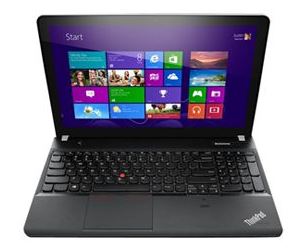
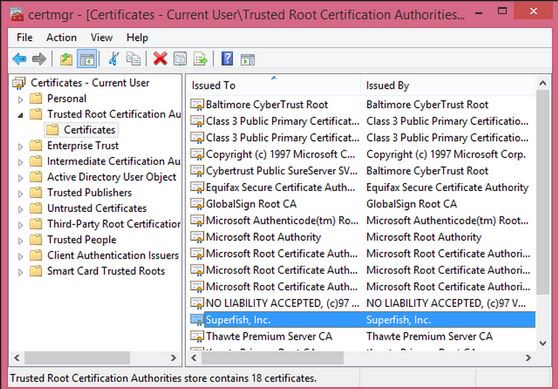
lenovolaptopIt has been discovered that the plethora of advertising extras pre-installed on Lenovo laptops contains a hidden danger.  A piece of adware, known as “Superfish Visual Discovery”, actually conducts a type of attack known as “MiTM” or Man-in-the-Middle, where it messes with that lovely new laptop’s configuration, and actually compromises a key security component. And no, that is not supposed to happen.  Which is why I think it’s time to speak up and speak out about this practice.

Plenty of top-drawer securitytech experts are currently dissecting and revealing the ugly truth about “Superfish”.  Simply put by Marc Rogers on Marc’s Security Ramblings,:

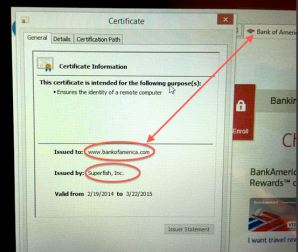
 badcert Lenovo is installing adware that uses a “man-in-the-middle” attack to break secure connections on affected laptops in order to access sensitive data and inject advertising. As if that wasn’t bad enough they installed a weak certificate into the system in a way that means affected users cannot trust any secure connections they make – TO ANY SITE.

Rik Ferguson offers this explanation on CounterMeasures:

 Superfish also installs its own self-signed Root Certificate Authority… Superfish can generate any certificate it wants, which will be trusted by your browser as entirely legitimate, allowing it to impersonate any destination on the internet. These sites are normally protected by strong encryption for your security

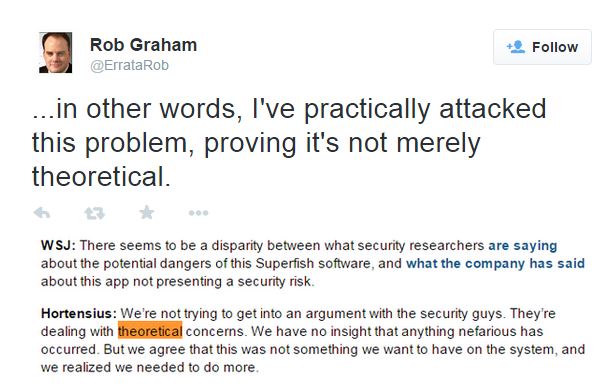
twittererRob Graham on Errata Security described how he was able to “intercept the encrypted communications of SuperFish’s victims (people with Lenovo laptops)”. On Twitter, he challenged the supposition by Peter Hortensius, CTO of Lenovo, that the problem was “theoretical” by saying how he had tested and proved otherwise.  And Steve Ragan on Salted Hash Security News hits the nail on the head when he states:

Even if the user removes the Superfish software, the certificate remains trusted and installed on the system. As for the opt-in requirement, most users agree to everything when configuring a new system, assuming they even notice the Superfish TOS to begin with.

What really bothers me is that most users don’t have the technical skillsets to understand what is actually happening, let alone to diagnose and disinfect.  From my years of experience working with end users, cleaning up this kind of mess definitely  falls outside reasonable expectations of what we should ask most people to do. Helping folks overcome their fear of technology is always challenging.  Most people would just like the problem to go away. Or for someone else to fix it.  There is a point to which you can lead users, but then they balk.certs

My team and I are all about simplifying technology for users. And honestly, if you can teach someone the easy ways to do things right, like security, then it’s like teaching that proverbial man to fish: they’ll be fine for the rest of their lives. But there is nothing simple about cleaning up malware, spyware, adware and the technical mess they inflict on devices.  Nobody who really cares about their customers should be asking them to start prodding around in program or registry files even if the customer is technically qualified.  Because confusion happens and mistakes can be made.

It’s really great to hear the outcry against what’s been going, and to put the issue squarely in front of major manufacturers. Time for certain parties to take a good look in the mirror: How can you proclaim your commitment to improving security when you’re actually contributing to a key source of problems? I love this statement by Marc Rogers on Marc’s Security Ramblings :

We trust our hardware manufacturers to build products that are secure. In this current climate of rising cybercrime, if you can’t trust your hardware manufacturer you are in a very difficult position

That said, what can you do about it? First and foremost, you need to get that junk off your device.  I’m happy to report that some terrific folks have been addressing that and there are some good suggestions on how to detect and remove.  For those inclined to do take the task on, read the steps through carefully a couple of times to make sure it’s clear before you undertake anything.  I can recommend this piece by PC World.  As well, I found this piece by ZDNet a little more detailed and perhaps easier to follow.

Crapware serves no purpose other than garnering profit.  Lenovo has a PR nightmare ahead, and they have a lot to answer for. While they claim to have halted shipping it back in January, that does nothing about what’s already out there.  Hopefully this serves notice to other distributors about cleaning up their acts so they don’t get caught up in the same net with “Superfish”.   Because the only real victims in this fish fry are the end-users.

NOTE: The awesome pic up at the top is by talented InfoSec member and artist @EddieTheYeti

Security Patches: One Step Forward, Two Steps Back

malware

Security breaches, mass DDoS attacks, ransomware mutations. No question about it – the challenges to information security are constant and ever-changing. Over the past twelve months, InfoSec has had to deal with threats not only of a greater magnitude in complexity but also in sheer volume. So in our concerted, and at times hasty, efforts to keep up with all that’s out there, are we leaving ourselves exposed? Do we need to double-back and cover our tracks?

Fact is, there is a lot to keep up with, even for security super-heroes. Given the nature of the beast, we’re always looking forward, trying to keep up or gain a little ground to ready ourselves for the next challenge. But what about those “backdoors” we just closed?

malware3Cleaning up after mass events like ShellShock/Bashbug and Heartbleed isn’t straightforward. Sadly, one patch does not fit all when there are multiple iterations of operating systems and devices. And the truth is – there just aren’t enough good people or hours in a day to comb through all the stuff out there to find and fix what’s at risk, much as we want to. Much as we need to. What happens next is inevitable. The adversary takes advantage, finds the hole, and builds exploits that we then must find and shut down in a series of blocks and tackles.

Here’s a recent case in point: Shellshock and QNAP. Shellshock doesn’t just impact servers. It impacts devices connecting to these servers through the internet: wireless access points, routers, smart fridges, video cams, webcams, even light bulbs. You can patch a server. It’s not so easy to patch a fridge. The real challenge has been to identify and patch all those different exposed devices. QNAP makes network attached storage devices that are popular world-wide. And therefore ideal targets for Shellshock exploits.

While QNAP did issue a firmware patch in October, Shellshock worm exploits were detailed later in December. The worm targeted a particular CGI script, /cgi-bin/authLogin.cgi, which could then be accessed without authentication. That would allow attackers to launch a shell script that could in future download more malware. Essentially, keeping the backdoor open.cgi backdoor

One of the interesting things noted about this worm, per Kaspersky’s detailed write up, was that the script it made then downloaded and installed QNAP’s Shellshock patch. Yes! But in a move that was strictly territorial to keep other opportunistic attackers out.

Kaspersky advised that

“IT staff responsible for these devices security should apply patches themselves, or a worm will do it. At a price”

I’ve followed up with QNAP, and nothing else has been issued. The onus is on the users to identify and patch their products. Need I say more?

It’s easy to lose track when the tyranny of the urgent sets our agendas for us. And it’s hard to be proactive when you’re busy fighting fires. But the fact is we need to keep watching those backdoors – because they don’t always shut completely.

This post was featured on DarkMatters, the security blog by Norse Corp

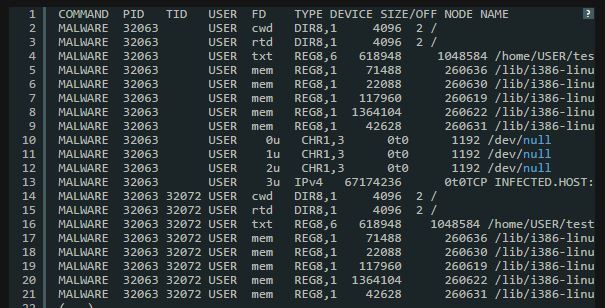
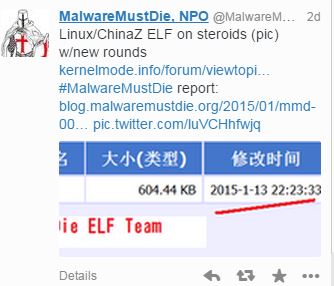
The lead illustration is an actual screencapture of Shellshock malware by MalwareMustDie.org, a whitehat security research workgroup

Why Encryption Matters: Political Insecurity vs InfoSec

cam and bam

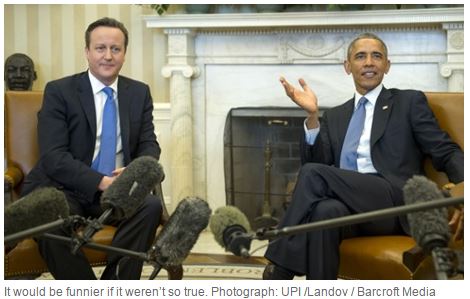
You own your own security. Bottom-line, when it comes down to planning how to protect yourself and what is yours, that decision should belong to you. But that’s not what President Obama, UK Prime Minister David Cameron or French Prime Minister Hollande would have you believe after their exchange of inflammatory rhetoric last week. If these three global leaders have their way, rather than securing our freedoms in the face of terrorism, they’ll be restricting the safeguards we need in place, and opening the cyber backdoor to those threats they fear most.

It appears fear fuelled knee-jerk reactions following the horrific terror attacks in France. French PM Hollande called for tighter surveillance measures to potentially weaken and cripple encryption in France. That encouraged UK Prime Minister David Cameron to say he’d like to ban certain forms of encryption, impacting popular messaging apps like iMessage and WhatsApp. You can read this post by Cory Doctorow to get a shopping list of what they want to limit http://boingboing.net/2015/01/13/what-david-cameron-just-propos.html. US President Obama’s new Internet security proviso followed hard on the heels of Cameron’s call to outlaw encryption. Instead, they want to build “backdoors” into applications, that would allow government officials to have the ability to read all media and messages, and effectively give the state far more access and control over everyone else. But as Cory so aptly points out “there’s no back door that only lets good guys go through it.”

Official White House photo by Pete Souza

Official White House photo by Pete Souza

When Obama delivers his State of The Union address on January 20th, he’s going to make his case against encryption, and against the people in InfoSec who watch our backdoors constantly, identifying and tracking down threats from around the world.  There is a lot of money being made by people who can breach security, acquire our personal data, and sell it to the highest bidder.  The stakes are much higher when it comes to securing our critical infrastructure: power, water, communications, defense.  We have clear proof that those systems have already been targeted and penetrated.  Those systems are vital to our way of life, and deserve the best protection we can offer.

Rob Graham has written an excellent response to this in his blog, Errata Security, and he levels this warning: “The most important innovators this law would affect are the cybersecurity professionals that protect the Internet. If you cared about things such as “national security” and “cyberterrorism”, then this should be your biggest fear…This creates an open-door for nation-state hackers and the real cybercriminals.” http://blog.erratasec.com/2015/01/obams-war-on-hackers.html#.VL1RgkfF_p6.

mw2

Call me crazy, but I think we should listen to those who know a lot more then the rest of us think we do. Misguided Security warns “once this Pandora’s Box is opened, it’s going to be damn hard to shut and the talented people who do great research and help protect the public from people and organizations that are truly scary”. http://misguidedsecurity.blogspot.ca/2015/01/wi-fight.html Encryption keeps data safe, keeps identities safe, whereas backdoors and uninvited surveillance create risk.

mw1

These guys aren’t the hackers – they’re the ones that protect us from them.  Yet the term is dangerously misunderstood. Rob Graham explains “Because of our knowledge, we do innocent things that look to outsiders like “hacking”. Protecting computers often means attacking them.” There’s a diligent army of highly skilled folks working on our behalf out there, scrutinizing infinite lines of code to catch what we don’t want to have. They share what they learn in real time, a collaborative, co-operative and highly effective network. Given the opportunity, we really should be listening to them.

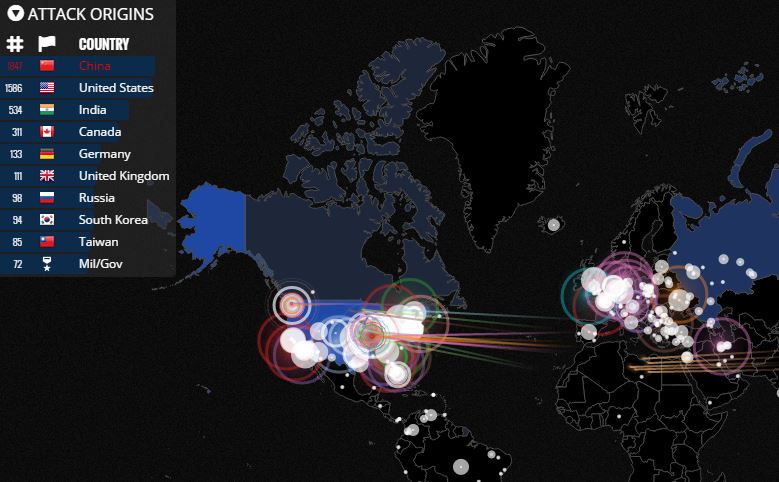
Thanks to the folks in InfoSec and the tools they use daily, I’ve watched botnets being launched by attackers from China.  To see what is coming at us in real time just click on this link to a map by Norse  http://map.ipviking.com/

norse

tshirt

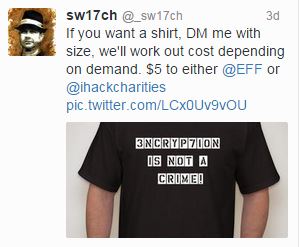
We need the freedom to innovate and explore technology so that it will serve us better. As Rob Graham points out, “Internet innovation happens by trying things first then asking for permission later. Obama’s law will change that. ”  How can we defend ourselves if we handcuff those who do? There’s currently a movement afoot within the InfoSec community to spread the word and explain the real value of encryption so that everybody understands they have a stake in this. (I admit, I may be owning one of these shirts myself).

Currently, this seems to be couched as a “tech” issue, with the political pundits throwing words around like “cyber”, “encryption” and “hacker”, terms that can easily be used in a campaign of fear-mongering by government policy makers to assume control. The assumption is that the average person will probably stop listening because they consider this out of their realm, so it doesn’t apply to them. But that couldn’t be further from the truth. This argument is not just about technology anymore. It challenges current standards of freedom and privacy, and within that, how we get to protect ourselves. And everything we hold dear. Isn’t that our decision to make?

Attribution: A Word to the Wise

sony2It has been one month since the hack attack on Sony.  Thirty days rife with speculation, hype and hyperbole that threw the press into a feeding frenzy.  In early days it seemed temptingly easy to believe the attack was in retaliation by North Korea for an American comedy that showed their beloved dictator, Kim Jong Un, being executed.  North Korea made an excellent villain as the story played out, and the extent of the damage done to Sony was revealed.  For most people, the information as presented in the media made the decision for them: North Korea was behind the attack. But after reading a particularly relevant  blog post by Misguided Security (http://misguidedsecurity.blogspot.ca/2014/12/doing-un-walk.html), I realized I needed to carry the message forward:  not everyone is getting all the details on the Sony hack, and that is as damaging as the hack itself.

Let me admit my guilt here and now. I did believe that North Korea was behind the attack, setting the tone for one of my earlier blog posts.  While I still consider them an InfoSec menace, I’ve read and considered what other wiser, more informed minds had to say.  I’m very glad I did because now, in the true spirit of this blog, I can share what I have learned.

theinterview-640x236From the outset there were many within the InfoSec community who declared that there wasn’t enough proof that it could be North Korea.  Over the past few weeks, that chorus of voices has steadily grown, and consistently put forth solid reasons to back their arguments, all the time asking for definitive proof to back the allegations that it was North Korea.  It was a fair and rational stance, taken by a group of people who are dedicated to and experts on Information security.  More interested in promoting the truth than themselves, they put their reputations on the line to publicly dispute the assertions made by the FBI and high-profile press pundits.

These are people whose opinions I respect and trust, for good reason. They have years of experience tracking malware and real cyber threats.  As events unfolded and  coverage mushroomed, the CEO  of TrustedSec  showed the need for calmer heads to prevail when he said  “Speculation backed with little facts …we need to be careful…” and then “ We are using some strong words right now and need to back it up without a shadow of a doubt.”  His sentiments were echoed by another cautionary voice in the InfoSec community. “We have to be careful on our rhetoric of war and blame, as these little comments can mean big things.”(Jericho).

sonypictureshack-640x1136

There are now many excellent blogs and posts about the attack on Sony, and they all give compelling reasons why we should think before we jump on any bandwagon, in this case the one that North Korea did it.  The best place to start is with a simple, factual chronology of events.  I like this on-going post, started  Dec. 5 by Risk-Based Security  (https://www.riskbasedsecurity.com/2014/12/a-breakdown-and-analysis-of-the-december-2014-sony-hack/).  It states, for example, how the now-infamous “Passwords” folder likely was created by the hackers, GOP, when they released the files, and not Sony.  But perception is paramount in the blame-game, and unfortunately Sony found itself caught in the unforgiving glare of speculation.  Deflecting negative publicity onto North Korea as the evil perpetrator could help serve as damage control, especially if they were portrayed as a threat to national security. That wasn’t hard to do in the given current global concerns regarding ISIS and the Middle East.

It’s so easy to jump to conclusions, to see what we want to see.  But as the Sony hack has hopefully taught us, we need to take the time to make informed decisions, and especially to listen to those who challenge assumptions with facts.  Throwing around accusations without proof isn’t just foolish, it’s dangerous.  It’s a great way to make a bad situation worse.  When we know certain nation states are capable of irrational and unpredictable behaviour when provoked, levelling accusations requires more care and discernment.  As ‘Jericho’ says, “make sure you are educated about what has happened the last 30 days, and then try to be a voice of reason in this ugly mess.” Because given all I’ve read, attribution can become a weapon, and not necessarily one of choice.

My Top 10 List: So What Did We Learn in 2014

malware3

There is no question that 2014 has been a most eventful year for InfoSec – and that’s not necessarily a good thing.  Data breaches, malware attacks, compromised Point-of-Sales systems, more data breaches. And of course – the Sony hack. A lot of painful lessons have been learned, many at high cost. So as the year draws to a close, let me present my Top 10 List of what I hope we learned from this year of events we wish we could forget.

1. PATCH IT. Patch it good! System software patches are an integral part of keeping your business, and yourself, safe.  Windows, Linux, Adobe, Oracle to name a few, all offer regular patches to cover those vulnerabilities that leave them exposed to hackers looking for a way in. Ideally, you should have a regular ie monthly schedule where patches are checked and updated.  Another thing to remember: test patches before you apply them. Microsoft has had two terrible months in a row issuing then recalling bad patches, but not before inflicting some major headaches on those who already applied them.   http://www.darkreading.com/application-security/time-to-rethink-patching-strategies/a/d-id/1318256?_mc=RSS_DR_EDT&utm_source=dlvr.it&utm_medium=twitter

B5fDUybIUAMF2IG2. THINK before you click that link.  Phishing and malvertising have reached prolific levels, and are designed so well it’s easy for everyone to fall for the bait. The onus is on us to be certain we know and trust the sender before we open attachments or click on links. Visiting popular websites or social media hopping is an open invitation to a nasty case of malware because many of these destinations have now become choice phishing holes. Don’t get lured in.   http://www.esecurityplanet.com/malware/dridex-and-email-a-nasty-social-engineering-team.html

3. Pass on that Password. This is your first and your best defence to secure anything of value.  Here is how to do it right. Ideally a length of 16 characters, with a mix of upper and lower cases, including numbers and special characters. Oh – and take a tip from Sony. Don’t file under “Passwords”. http://www.wired.com/2014/09/dont-get-hacked/?linkId=9521469

4. AntiVirus Protection. There are a range of options, and many good SOHO programs are even free, though I would strongly encourage paying more to invest in additional protection against cyber threats.  And yes – you definitely need to have this on your phone & tablet. Mobile devices are targets of choice. Given how much of our lives we keep on our phones, why would you put that at risk? Finally, don’t rely on out-dated or lapsed programs. In the constantly evolving world of malware and viruses, yesterday’s solutions won’t cut it. Always keep your AV updated.hacking-sony

5. Breach Protocol 101. If you get breached, handle the situation correctly and professionally. Your customers deserve the decency of being informed as soon as possible to protect themselves and take appropriate action. As in the case of Home Depot, don’t make customers wait for the bad news. Because you can’t put a price on trust and reputation. http://www.theglobeandmail.com/report-on-business/international-business/us-business/home-depot-shares-drop-after-chain-investigates-data-breach/article20308768/?cmpid=rss1&click=sf_rob

6. Secure your SOHO tech. Especially routers. Update, upgrade.
http://blog.norsecorp.com/2014/12/18/millions-at-risk-from-misfortune-cookie-soho-router-vulnerability/?utm_content=buffer85c25&utm_medium=social&utm_source=twitter.com&utm_campaign=bufferrouter

7. WiFI Hotspots: Use with extreme caution! In this holiday season of travel and shopping, convenience may be king but letting your guard down isn’t worth it. Secure your tech first – ‘Free’ comes with a price  http://www.onguardonline.gov/articles/0014-tips-using-public-wi-fi-networks

8. Things aren’t so fantastic when you pay in plastic. This year has proven repeatedly that credit cards are not secure. But given that so much our retail and online world run on plastic, what can you do to stay safe? For starters, Always Check Your Statements. Be in charge of your accounts and know everything coming or going. Secondly, cover the keypad when you enter a PIN anywhere.  Because there really are “eyes in the skies” that are waiting for you to enter the magic number.

malware29. You get what you paid for. When you buy pirated software and 3rd party apps, you often get a free gift-with-purchase, but trust me, it’s one you don’t want. Malware, browser hijackers etc. It’s a headache to huntdown and then remove these nuisance products. You’re better off paying for the real deal.  http://www.scmagazine.com/pirated-joomla-wordpress-drupal-themes-and-plugins-contain-cryptophp-backdoor/article/385552/

10. Best for Last. HAVE A PLAN. When it happens – and it will – have a real Disaster Recovery/Business Continuity plan in place.  According to exper Dejan Kosutic, “It is the combination of people and technology that keeps a business running, not computers only, and this is exactly why the concept of business continuity has prevailed in the last couple of years.” According to CISCO, “60% of Canadian businesses either don’t have a security strategy in place, or don’t know if their current one accounts sufficiently for change and evolution to effectively meet threats.” http://www.itworldcanada.com/article/majority-of-canadian-firms-not-prepared-for-cyber-threats-cisco/100226

And on that cheery note, let me wish you all a safe and successful 2015!

What We Should Learn from Sony’s Pain

hacking-sonyIt is THE biggest news story. Period. And it will be a story that will live on in the telling because it wasn’t just how it happened, it was why.  The hacker attack two weeks ago on Sony was an unprecedented take-down of a global corporate giant by the Guardians of Peace (GOP), a group of cyber-terrorists operating from a small country across the globe.

By now, we all have heard the allegations against North Korea as being the power behind the hackers. North Korea is highly volatile, an unpredictable player in the current global theatre. That means their actions are more threatening. While there is no definitive proof, the code was written in Korean. Email messages have been sent from the GOP, a hacker group based in North (not South) Korea, demanding Sony take down the film ‘The Interview’ about assassinating leader Kim Jong Un. And then there’s the fact that in North Korea, a country known for austerity and deprivation, hackers are state-sponsored and treated as an elite group.

theinterview-640x236

They clearly have no problems developing a very malicious form of malware that disabled or destroyed equipment. This type of malware may have been used before. “Shamoon” as it was known then hit 30000 computers in 2012 in an attack against the oil company Saudi Aramco, and then again in an attack against South Korea in 2013. Moreover, they were able access and operate within Sony’s systems without detection for a considerable length of time.  Sony is a private corporation, but what if this had been done to a major power supplier, water regulator, or another entity considered part of the critical infrastructure. Cybercrime becomes cyber-terrorism.

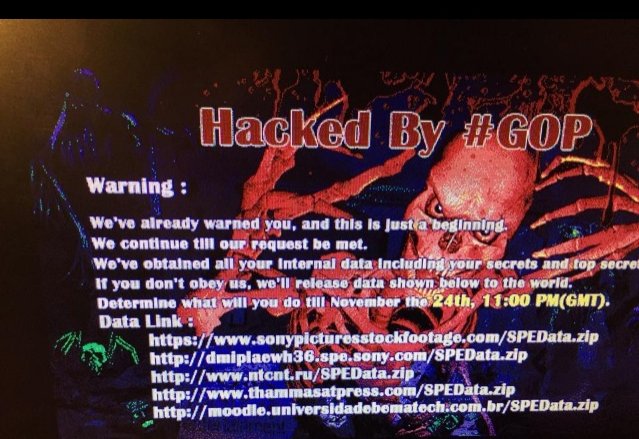
The economic costs to Sony will be staggering in terms of loss: equipment, intellectual sonypictureshack-640x1136property, confidential and personal data. Never mind the decimation of employee morale and company reputation. The hackers have been contacting families at Sony, telling them they must take their side or else. The GOP got their timing right, striking just before the Christmas release peak season, and they have brought Sony to its knees.

So what do we take away from this? Back in June, North Korea promised to “mercilessly destroy” anyone associated with the film. Did Sony not see this coming? Whatever they suspected, no provisions appear to have been made. Now, it’s damage control. And here’s the first lesson going forward for us all – as details unfold, they further expose the open wound and that can be more painful than the attack itself. In Sony’s case, it’s been revealed that they kept corporate passwords in a file called ‘Passwords’. Yes, I know. While that in itself didn’t facilitate the attack, it implies that Sony was careless, inviting further unwanted speculation.
password-hackedAnd here is the second hard lesson: regardless of how good a defense companies put up against outside hacks, they’re only as good as their weakest link in the security chain which more often than not is human error. In Sony’s case, that meant the problem could have come from within, as simple as someone unwittingly opening those carefully constructed security doors to let the attackers in. For all that companies train and advise their staff, they cannot control their every move or decision. Malware has become an art form in deception, reflecting the spectrum of human weakness.

My hard look at the bottom line: Sony didn’t know how the GOP would strike, but they knew they were at risk, and who the threat was. If this attack could be attributed to state-sponsored North Korean hackers, then current concerns being expressed for the safety of our critical infrastructure need more than words and firewalls. The onus was on Sony to secure their assets, ensuring what measures they had in place were effective. If due diligence is where we can all fall short, we need to close that door or risk more events like this.

.

A Nasty Case of Krab Web

Computer security concept in word tag cloud on white background

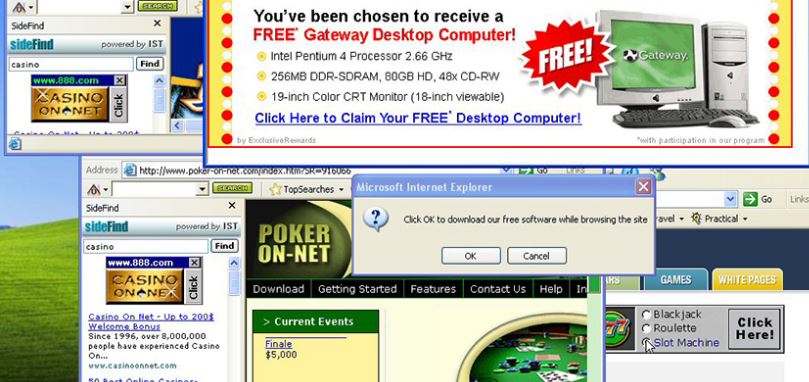
It can happen to anyone. Suddenly, your computer screen is an explosion of pop-ups. You think you’ve clicked close only to have another pop-up take its place.  And then they start opening something you never agreed to. Frantically, you try to shut things down only to discover your cursor has a mind of its own. You try to Google what to do, and keep going to a site you’ve never heard of and don’t want. Welcome to the nightmare of a malware infestation.

MALWARE ATTACK! What Do I Do NOW?

screenfull1

I just spent some quality time cleaning a nasty case of Krab Web malware off a laptop. The user had no idea what the item she downloaded would come bundled with. So, let that be my first helpful lesson to you.  Unless you download directly from the source, you are getting your downloads from third party distributor. The names are common, including biggies like CNET and Softonic.  It isn’t that you can’t trust them.  It’s that even they can’t trust what’s going into the mix.  Your best bet is to forego the default installation choice and choose “custom”.  Because when you just click and agree, a couple pages will zoom past. You may think you agreed to another toolbar but you just signed on the dotted line for a dozen – no, I am so not kidding – a dozen or more annoying and even malicious programs that will take you where you do not want to go.  By this, I mean sites where they are phishing for you and downloadable remote access bogeys lurk. But that is a whole separate posting of pain for another day.

STEP 1: Identify and Destroy

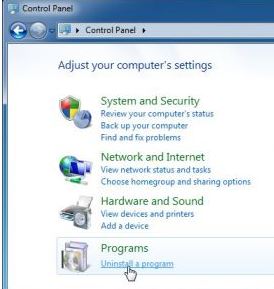
step1Let’s say you are on Windows. Open the Control Panel. Then, select Program and Uninstall.  Try to bear with all the pop-up boxes and not click anything.  Once the list of programs appears, click on the Date column to bring up items most recently added. You should see a list of at least 12 or so from when you did your download.  Some will say “Optimizer”, some will say “Protection”, some will say “Best deals”.  They are all bogus.  You want NONE of them. Start by selecting each one and clicking Uninstall.  You can agree to using the program’s own uninstaller remove it. That’s normal. And the best way to get rid of them.  Here’s what I tossed in the trash:

  • Remote Desktop Access VuuPC\
  • PepperZip
  • Optimizer Pro
  • StormWatch
  • Search Protection
  • My PC Backup
  • Surfkeepit
  • eDeals
  • SPT System Updater Service
  • Word Prozer
  • HQ ProVideo
  • Fast Player

Yes, they may sound legit.  But they all had today’s date stamp, and some of them were particularly nasty malware/adware.  As the song says “Don’t Get Fooled Again!”

STEP 2: Remove Adware using ADWCleaner

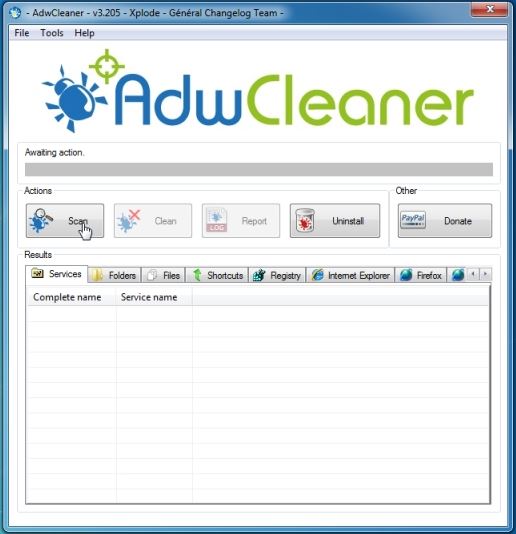
adwYou may be able to access your browser at this point. If you can, go to this site: ADWCLEANER DOWNLOAD LINK to download an effective Adware cleaner.

Follow the instructions and install. Click on the “Scan” button and then click “Clean”.  You’ll have to reboot.


STEP 3: Remove program files with MalwareBytes

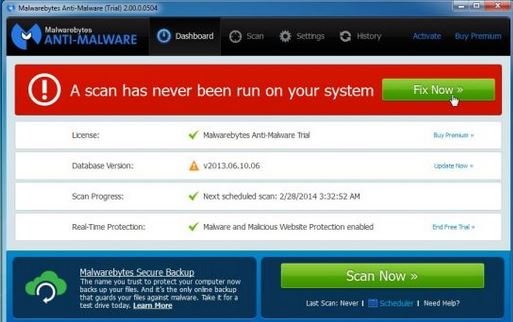
malbytesNow, you  need a program to go after the virus, Krab in this case. Download  MALWAREBYTES ANTI-MALWARE. Follow the prompts and install the free version.


 If prompted, click the green “Fix now” box to start the scan.

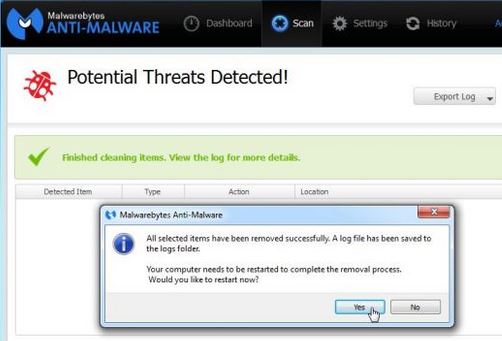
malbyte2You may be prompted to upload updates. Click agree.   The program will scan, you can watch the progress, and when it’s done you’ll be notified.  The dangerous files will be quarantined, and expect to be asked to reboot. Say yes.


STEP 4: Clean your Browsers

google1You will probably notice a delightful lack of pop-ups this time. But you’re not in the clear yet. You need to clean your browsers now.  Follow these steps as outlined.

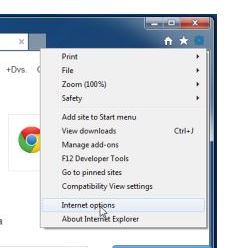
If you use Internet Explorer, click on the right corner gear icon for Settings. From the drop down box, click Internet Options.


google2

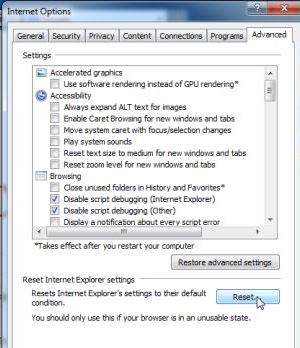
In the next box, click on the “Advanced” tab. Click on the “Reset” button. In the next box, select “Delete Personal Settings” and click “Reset”. When Explorer is finished, click close.


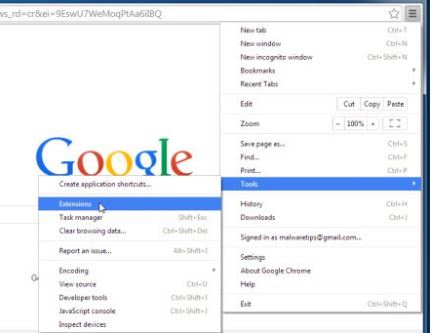
googleFor Google Chrome, click this symbol at the top right: symbol. Then, click on “Tools” and then “Extensions”.


In the Extensions tab, you’ll see Krab Web and other items, some which you don’t recognize. Click on the trash can icon beside those you want to remove. If you didn’t install it, delete it. extensions


STEP 5: Check the Spread

A note of caution: Malware spreads with physical contact so you need to check any other devices you’ve connected to your computer, like USB or flash drives, tablets, or even your phone.  Run a scan using your anti-virus and Malware Bytes.Trust me – you’ll be glad you did. Now you’re clean and protected. Surf safe!

** A big thank you to MalwareTips.com and their helpful site