
Friday Fun: InfoSec Geek Speak

geekkspeakFind yourself mystified by all the acronyms and terms you hear when anything tech comes up? You don’t want to speak it – you just wish you knew what the heck it meant. No problem. In today’s Friday Fun installment, I’ll get you up to speed. Thanks to the fine folks at Raytheon, (sponsors of this excellent endeavour, the National Collegiate Cyber Defense Competition NCCDC) I can share this glossary of terms.  And consider yourself just that much more up to speed on your own safety and security!

InfoSec Geek Speak Glossary

@ — Symbol chosen by Ray Tomlinson, a Raytheon BBN Technologies engineer who sent the first Internet email, to separate the names of users and their networks in addresses.

Advanced Persistent Threat — A group, such as a government or a criminal organization, with the expertise, resources and intent to target a specific entity. An APT uses multiple methods to break into a network, avoid detection and harvest valuable information over a long period of time.

apt

Air gap — To physically separate or isolate a secure network from other unsecured systems or networks.

Back door — A hidden entry to a computer, network or software that bypasses security measures.

Blackhat — A criminal hacker who breaches security for malicious reasons or personal gain.

Blue Team — A group defending a computer system from mock attackers, usually as part of a controlled exercise. During the Raytheon National Collegiate Cyber Defense Competition the blue teams are made up of students.

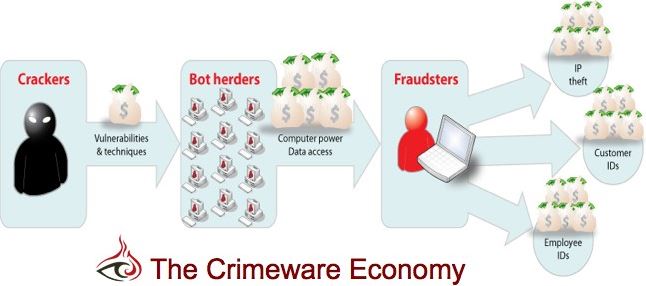
Bot — A program that automates a simple action. Bots infect computers and secretly perform activities under the control of a remote administrator.

Botnet — A collection of computers infected by bots.botnets

Bot master or herder —Someone who controls a botnet.

DoS Attack — A Denial-of-Service attack disrupts a website, server, or network resource – often by flooding it with more requests than it can handle.

DDoS Attack — A Distributed Denial of Service Attack is a DoS attack using a multitude of machines. Hackers often control one “master” machine to orchestrate the actions of “zombie” machines.

End-point Security — Security measures that protect a network from potential vulnerabilities posed by laptops and other mobile devices that access the network remotely.

Fuzzing — Automated input of invalid, unexpected or random data to a computer program. “Shocking” a computer in this way can reveal vulnerabilities.

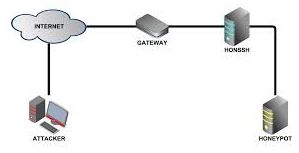
Honeypot — A trap set to detect intruders. A honeypot usually simulates a real network but is actually isolated and monitored so it can give advance warning of an intrusion.

honeypot1  honeypot2

Insider threat – A threat posed by employees, contractors, business associates or other people who have inside access to a computer system. Raytheon is the No. 1 insider threat solution provider, protecting hundreds of thousands of endpoints.

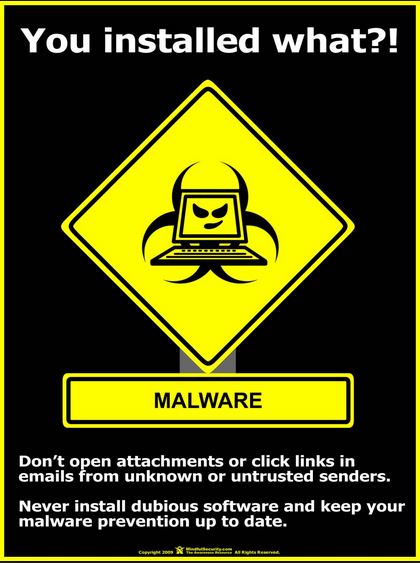
Malware —Software designed to hijack, damage, destroy or steal information from a device or system. Variations include spyware, adware, rootkits, viruses, keyloggers, and more.

Patching —The process of updating software.

Pentest — Short for penetration testing, or trying to hack into a system to identify weaknesses.

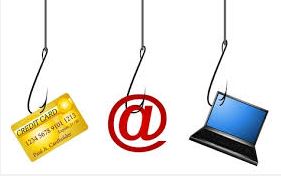
Phishing — Tricking someone into giving away personal information by imitating legitimate companies, organizations, or people online. The “ph” derives from phreaking, or “phone freaking” — hijacking telephone lines. Spearphishing focuses on a particular target.

phish

Pwned — Pronounced like owned with a “p” at the beginning, pwned means to defeat security measures. Derives from the word “own,” or dominate.

Red Team — A group of cybersecurity professionals authorized to simulate an attack. A “blue team” of students will face a red team at the Raytheon National Collegiate Cyber Defense Competition.

Social Engineering —Manipulating people into sharing private information.

White Team — A group responsible for refereeing an engagement between a red team of mock attackers and a blue team of cyber defenders.

Whitelist — The opposite of a blacklist, a whitelist is a list of people, groups or software OK’d for system access.

Zombie — An infected device that is used to perform malicious tasks under remote control. Botnets of zombie computers are often used to spread e-mail spam and launch denial-of-service (DoS) attacks.
Thanks for reading and remember … “You Own Your Own Security!”

DRP: What Have I Got to Lose

drp1

It happens when you least expect it, when the timing is bad, when it’s the last thing you’re prepared to deal with. That’s why it’s a disaster. But the real disaster is that so few companies are ready with a plan to get them through one.

Most Don’t Have One

As per research done by Symantec in a study from 2011, 57% of small to medium businesses didn’t have a Disaster Recovery Plan (DRP). Those numbers don’t appear to be improving. From an article in February 2015, roughly 60% of businesses in Canada did not have a plan in place to address security incidents like hack attacks, breaches or system failures. This information comes from 2 online surveys done by analyst firm IDC Canada for Cisco, comprising 2000 Canadians and 498 Canadian businesses.

Questions addressed security preparedness, and topics like security policies, recent cyber attacks, and familiarity with mobile and cloud-based applications. The result? Per Cisco “many Canadian businesses operate without any security strategy for their networks and are ‘woefully unprepared’”.

drp2

It’s like jumping without a net. Per CRA, a managed IT solutions firm in NYC, the average cost per day of IT downtime can amount to as much as $12,500. Many smaller businesses fail to recover from the financial losses they sustain, and go out of business within a year. As stated by Tom Richer, CRA Chief Sales & Marketing Officer:

SMBs that do not have a disaster recovery plan are taking an unnecessary risk. Not recovering quickly from a disaster or outage could mean the loss of many clients and revenue

So Why Not?

If we know the risks are growing and the costs of downtime are perilously high, why do so few companies have a plan in place? Below are the results from a recent survey done by Continuity Central. The numbers speak for themselves:

  • Lack of budget, funds and resources: 35.6 percent
  • Lack of top management commitment, buy-in and support: 16.4 percent
  • Lack of business unit support: 6.6 percent
  • The low priority given to BCM compared to other deliverables. 5.3 percent
  • Organizational apathy towards BCM: 4.9 percent
  • Staffing difficulties (loss of business continuity staff and difficulties in recruiting staff with appropriate qualifications): 4.8 percent
  • Lack of time available for business continuity staff to manage all their tasks: 3.5 percent

Simply put, lack of preparedness equals a perceived lack of funds and an ongoing lack of buy-in. We are looking at the formula for disaster.

drive crash

What Are You Waiting For?

Last year gave us

  • Mass data breaches: illustrating how Point of Sale malware is increasingly pervasive, continuing to feed our valuable information into the coffers of cybercriminals across the globe
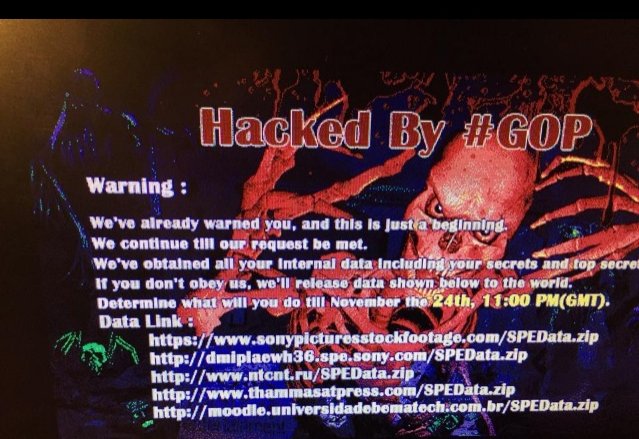
  • The Sony Hack: how disgruntled employees can become destructive forces we don’t anticipate
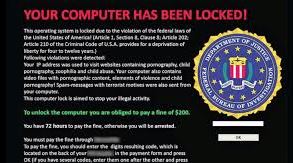
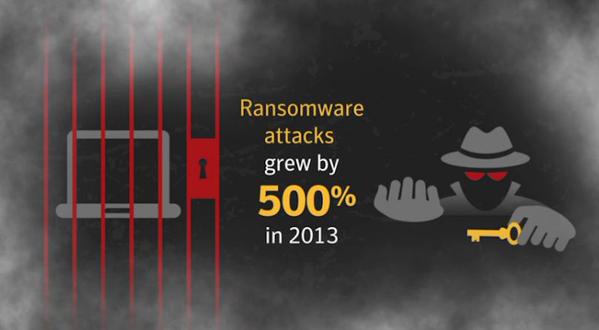
  • Ransomware: cybercrime knows how to hold us hostage, and we pay regardless
  • Natural disasters: global warming or not, tornadoes, hurricanes, massive blizzards shut down cities and businesses every year

Putting a Disaster Recovery Plan in place is a lot easier than cleaning up the aftermath of a disaster. There are many approaches and templates to work from (I would love to help you with that – just ask!) but the best approach is to take the proverbial bull by the horns and get to work on your plan. Because the old adage holds true: failure to plan is a plan to fail. Don’t let it be yours.

(currently featured on the JIG Technologies corporate site)

Malware Primer: Browser Hijackers & Adware & Spyware. Oh My!

Welcome back for another installment in our series on Malware 101. This time, we’ll get delve into the devious realm of browser hijackers and adware.

hijack1

Not all surprises are nice. Like when you type in one destination online, and find yourself on another site you really don’t want. And try as you might, you just keep landing back at that site. Sorry but you’ve just been hijacked by your browser. More accurately, by the hacker who has used malware to take control of your browser, and your surfing.

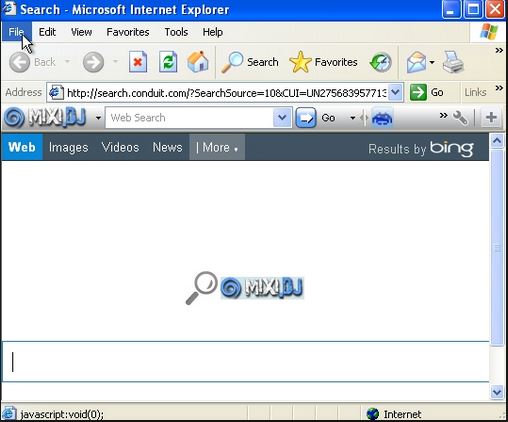
Browser hijacks are performed by malicious software that redirects your browser – Exploer, Google, Firefox, Safari – to a specific site.  This site can then be used to download malware onto your computer, without you realizing it. It’s known as a “drive-by download”, quick and dirty.

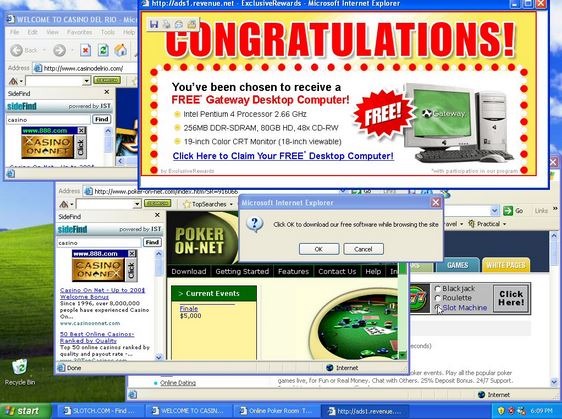
It gets worse. You know those bundled offers you get, or combos, whether you want them or not? Well, you’ve not only been hijacked, but you have likely been loaded up with a bunch of malware to take back. Your screen will soon fill with annoying pop-ups; your computer will seem sluggish; strange things will happen to your files. A lot of this is adware, often bundled with browser hijackers. And all courtesy of something you clicked on.

adware

While the adware is annoying, the spyware it carries is more malicious. This stuff hides on your computer, where it tracks and monitors everything you do. Yes that email, tweet, ridiculous comment, all have been recorded and sent elsewhere. Worse, your personal details, banking information and sign on credentials have also been captured for sale and use by somebody you really don’t want to know.

Think of this stuff as tech VD, because cleaning up a nasty infestation reveals it to be a gift that keeps on giving. It’s hard to detect initially. Once you do catch on, the malware has proliferated and spread through your computer. You’ll likely need professional assistance to do a really good clean up job. Unless you have the patience and expertise to follow all the steps and use several different programs to unearth and remove all the malicious files.  It is doable, but you need to be diligent because you need to find and remove all of it. Otherwise, you’ll get reinfected.

Remember – You Own Your Own Security.  Take charge!

Back It Up, Back It UP!

(A cautionary tale and my little take on “Shake It Off” by Taylor Swift)

I left it too late
Got nothing on my plate
That’s what my disk drive says mmm-mmm

Now my files are all gone (sob)crash3
And I know something is wrong
At least that’s what the server says mmm-mmm
That’s what the server says mmm-mmm

So I keep losing
All the work that I was doing
It’s like I got this hole
In my drives
And it’s not gonna be alright

‘Cause the data’s gone away, way, way, way, waybash
And now it’s way too late, late, late, late, late
Baby, I’m just gonna cry, cry, cry, cry, cry
I shoulda backed it up, backed it up
Shellshock is gonna bash, bash, bash, bash, bash
And the hackers gonna hack, hack, hack, hack, hack
Baby, I’m just gonna cry, cry, cry, cry, cry
I shoulda backed it up, backed it up

When we got hacked todayransomware
By Ransomware – won’t pay
That’s what they say don’t do mmm-mmm

Get the backups- Let’s restore! (backup and restore)
Is this all- why aren’t there more? (why, why aren’t there more?)
So I tell them I don’t know, mmm-mmm
I tell them I don’t know, mmm-mmm

And we are losing
The work that we’ve been doing
It’s like we got this hole
In the drives
And it’s not gonna be alright

‘Cause the data’s gone away, way, way, way, waysonypictureshack-640x1136
And now it’s way too late, late, late, late, late
Baby, I’m just gonna cry, cry, cry, cry, cry
I shoulda backed it up, backed it up
Our site is getting hacked, hacked, hacked, hacked, hacked
Our accounts are getting jacked, jacked, jacked, jacked, jacked
Baby, I’m just gonna cry, cry, cry, cry, cry
I shoulda backed it up, backed it up

Back it up, I’ll back it up
I, I’m gonna back it up, back it up

Yeah ohhhh!!!!

Yeah the price we had to pay, pay, pay, pay, paydrive crash
But today’s a different day, day, day, day, day
Baby, I’m just gonna save, save, save, save, save
Now I back it up, I back it up
If the hard drive’s gonna crash, crash, crash, crash, crash
Or tornadoes gonna smash, smash, smash, smash, smash
Baby, I’m not gonna cry, cry, cry, cry, cry
Cause I back it up, I BACK IT UP!

You know what you gotta do – go do it!

Superfish and Lenovo: One Big Fish Fry

“Superfish” by @EddieTheYeti

There’s a nasty little game afoot where new laptops come with undesirable extras. I’m talking about “crapware” – all those annoying little programs and invitations to sign up and buy that suddenly fill your screen moments after you first boot up.  That’s not the way anyone deserves to experience those heady first moments with a major new purchase. And yet, it’s exactly what happens with nearly all new laptops and pcs.

If you ask, you’re told that it’s been in practice by big companies for a while; that it’s the way business is done; that it’s nothing to worry about.  That doesn’t make it right.  And as of today, that doesn’t make it safe.

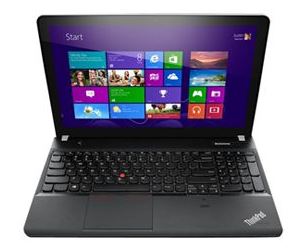
lenovolaptopIt has been discovered that the plethora of advertising extras pre-installed on Lenovo laptops contains a hidden danger.  A piece of adware, known as “Superfish Visual Discovery”, actually conducts a type of attack known as “MiTM” or Man-in-the-Middle, where it messes with that lovely new laptop’s configuration, and actually compromises a key security component. And no, that is not supposed to happen.  Which is why I think it’s time to speak up and speak out about this practice.

Plenty of top-drawer securitytech experts are currently dissecting and revealing the ugly truth about “Superfish”.  Simply put by Marc Rogers on Marc’s Security Ramblings,:

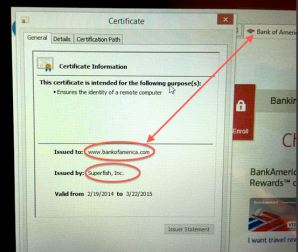
 badcert Lenovo is installing adware that uses a “man-in-the-middle” attack to break secure connections on affected laptops in order to access sensitive data and inject advertising. As if that wasn’t bad enough they installed a weak certificate into the system in a way that means affected users cannot trust any secure connections they make – TO ANY SITE.

Rik Ferguson offers this explanation on CounterMeasures:

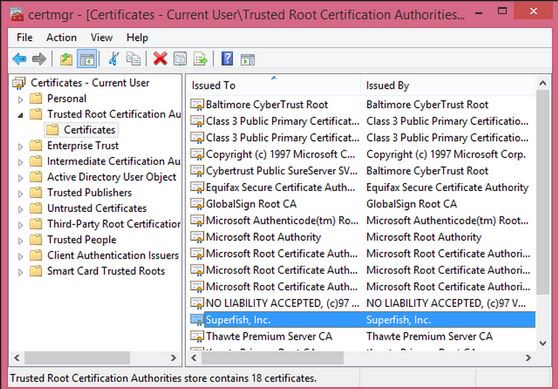
 Superfish also installs its own self-signed Root Certificate Authority… Superfish can generate any certificate it wants, which will be trusted by your browser as entirely legitimate, allowing it to impersonate any destination on the internet. These sites are normally protected by strong encryption for your security

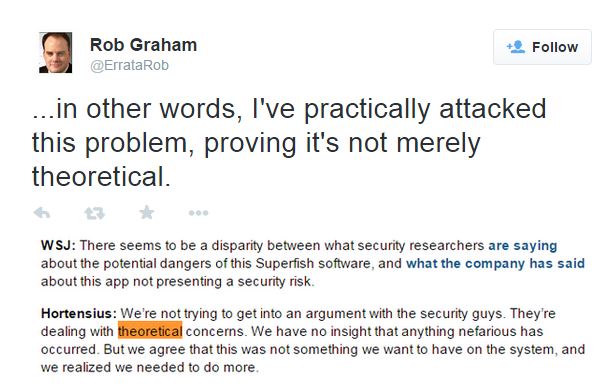
twittererRob Graham on Errata Security described how he was able to “intercept the encrypted communications of SuperFish’s victims (people with Lenovo laptops)”. On Twitter, he challenged the supposition by Peter Hortensius, CTO of Lenovo, that the problem was “theoretical” by saying how he had tested and proved otherwise.  And Steve Ragan on Salted Hash Security News hits the nail on the head when he states:

Even if the user removes the Superfish software, the certificate remains trusted and installed on the system. As for the opt-in requirement, most users agree to everything when configuring a new system, assuming they even notice the Superfish TOS to begin with.

What really bothers me is that most users don’t have the technical skillsets to understand what is actually happening, let alone to diagnose and disinfect.  From my years of experience working with end users, cleaning up this kind of mess definitely  falls outside reasonable expectations of what we should ask most people to do. Helping folks overcome their fear of technology is always challenging.  Most people would just like the problem to go away. Or for someone else to fix it.  There is a point to which you can lead users, but then they balk.certs

My team and I are all about simplifying technology for users. And honestly, if you can teach someone the easy ways to do things right, like security, then it’s like teaching that proverbial man to fish: they’ll be fine for the rest of their lives. But there is nothing simple about cleaning up malware, spyware, adware and the technical mess they inflict on devices.  Nobody who really cares about their customers should be asking them to start prodding around in program or registry files even if the customer is technically qualified.  Because confusion happens and mistakes can be made.

It’s really great to hear the outcry against what’s been going, and to put the issue squarely in front of major manufacturers. Time for certain parties to take a good look in the mirror: How can you proclaim your commitment to improving security when you’re actually contributing to a key source of problems? I love this statement by Marc Rogers on Marc’s Security Ramblings :

We trust our hardware manufacturers to build products that are secure. In this current climate of rising cybercrime, if you can’t trust your hardware manufacturer you are in a very difficult position

That said, what can you do about it? First and foremost, you need to get that junk off your device.  I’m happy to report that some terrific folks have been addressing that and there are some good suggestions on how to detect and remove.  For those inclined to do take the task on, read the steps through carefully a couple of times to make sure it’s clear before you undertake anything.  I can recommend this piece by PC World.  As well, I found this piece by ZDNet a little more detailed and perhaps easier to follow.

Crapware serves no purpose other than garnering profit.  Lenovo has a PR nightmare ahead, and they have a lot to answer for. While they claim to have halted shipping it back in January, that does nothing about what’s already out there.  Hopefully this serves notice to other distributors about cleaning up their acts so they don’t get caught up in the same net with “Superfish”.   Because the only real victims in this fish fry are the end-users.

NOTE: The awesome pic up at the top is by talented InfoSec member and artist @EddieTheYeti

Why Encryption Matters: Political Insecurity vs InfoSec

cam and bam

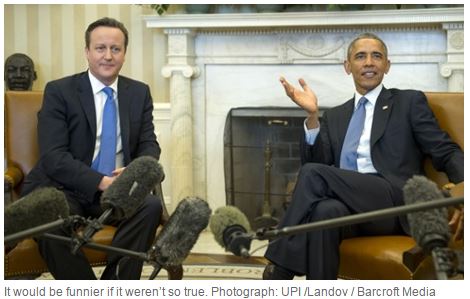
You own your own security. Bottom-line, when it comes down to planning how to protect yourself and what is yours, that decision should belong to you. But that’s not what President Obama, UK Prime Minister David Cameron or French Prime Minister Hollande would have you believe after their exchange of inflammatory rhetoric last week. If these three global leaders have their way, rather than securing our freedoms in the face of terrorism, they’ll be restricting the safeguards we need in place, and opening the cyber backdoor to those threats they fear most.

It appears fear fuelled knee-jerk reactions following the horrific terror attacks in France. French PM Hollande called for tighter surveillance measures to potentially weaken and cripple encryption in France. That encouraged UK Prime Minister David Cameron to say he’d like to ban certain forms of encryption, impacting popular messaging apps like iMessage and WhatsApp. You can read this post by Cory Doctorow to get a shopping list of what they want to limit http://boingboing.net/2015/01/13/what-david-cameron-just-propos.html. US President Obama’s new Internet security proviso followed hard on the heels of Cameron’s call to outlaw encryption. Instead, they want to build “backdoors” into applications, that would allow government officials to have the ability to read all media and messages, and effectively give the state far more access and control over everyone else. But as Cory so aptly points out “there’s no back door that only lets good guys go through it.”

Official White House photo by Pete Souza

Official White House photo by Pete Souza

When Obama delivers his State of The Union address on January 20th, he’s going to make his case against encryption, and against the people in InfoSec who watch our backdoors constantly, identifying and tracking down threats from around the world.  There is a lot of money being made by people who can breach security, acquire our personal data, and sell it to the highest bidder.  The stakes are much higher when it comes to securing our critical infrastructure: power, water, communications, defense.  We have clear proof that those systems have already been targeted and penetrated.  Those systems are vital to our way of life, and deserve the best protection we can offer.

Rob Graham has written an excellent response to this in his blog, Errata Security, and he levels this warning: “The most important innovators this law would affect are the cybersecurity professionals that protect the Internet. If you cared about things such as “national security” and “cyberterrorism”, then this should be your biggest fear…This creates an open-door for nation-state hackers and the real cybercriminals.” http://blog.erratasec.com/2015/01/obams-war-on-hackers.html#.VL1RgkfF_p6.

mw2

Call me crazy, but I think we should listen to those who know a lot more then the rest of us think we do. Misguided Security warns “once this Pandora’s Box is opened, it’s going to be damn hard to shut and the talented people who do great research and help protect the public from people and organizations that are truly scary”. http://misguidedsecurity.blogspot.ca/2015/01/wi-fight.html Encryption keeps data safe, keeps identities safe, whereas backdoors and uninvited surveillance create risk.

mw1

These guys aren’t the hackers – they’re the ones that protect us from them.  Yet the term is dangerously misunderstood. Rob Graham explains “Because of our knowledge, we do innocent things that look to outsiders like “hacking”. Protecting computers often means attacking them.” There’s a diligent army of highly skilled folks working on our behalf out there, scrutinizing infinite lines of code to catch what we don’t want to have. They share what they learn in real time, a collaborative, co-operative and highly effective network. Given the opportunity, we really should be listening to them.

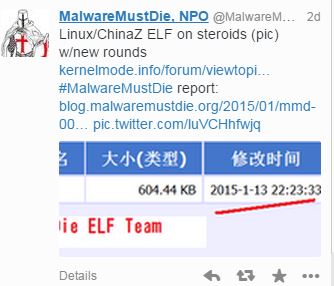
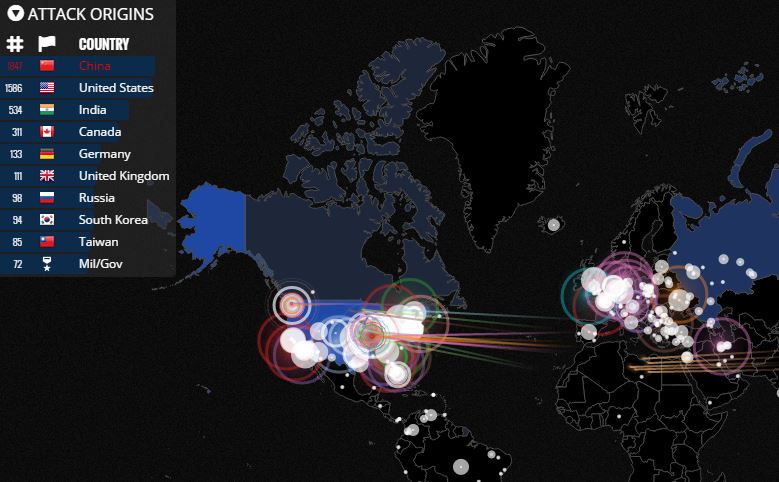
Thanks to the folks in InfoSec and the tools they use daily, I’ve watched botnets being launched by attackers from China.  To see what is coming at us in real time just click on this link to a map by Norse  http://map.ipviking.com/

norse

tshirt

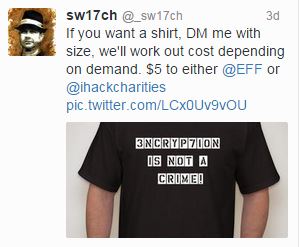
We need the freedom to innovate and explore technology so that it will serve us better. As Rob Graham points out, “Internet innovation happens by trying things first then asking for permission later. Obama’s law will change that. ”  How can we defend ourselves if we handcuff those who do? There’s currently a movement afoot within the InfoSec community to spread the word and explain the real value of encryption so that everybody understands they have a stake in this. (I admit, I may be owning one of these shirts myself).

Currently, this seems to be couched as a “tech” issue, with the political pundits throwing words around like “cyber”, “encryption” and “hacker”, terms that can easily be used in a campaign of fear-mongering by government policy makers to assume control. The assumption is that the average person will probably stop listening because they consider this out of their realm, so it doesn’t apply to them. But that couldn’t be further from the truth. This argument is not just about technology anymore. It challenges current standards of freedom and privacy, and within that, how we get to protect ourselves. And everything we hold dear. Isn’t that our decision to make?

My Top 10 List: So What Did We Learn in 2014

malware3

There is no question that 2014 has been a most eventful year for InfoSec – and that’s not necessarily a good thing.  Data breaches, malware attacks, compromised Point-of-Sales systems, more data breaches. And of course – the Sony hack. A lot of painful lessons have been learned, many at high cost. So as the year draws to a close, let me present my Top 10 List of what I hope we learned from this year of events we wish we could forget.

1. PATCH IT. Patch it good! System software patches are an integral part of keeping your business, and yourself, safe.  Windows, Linux, Adobe, Oracle to name a few, all offer regular patches to cover those vulnerabilities that leave them exposed to hackers looking for a way in. Ideally, you should have a regular ie monthly schedule where patches are checked and updated.  Another thing to remember: test patches before you apply them. Microsoft has had two terrible months in a row issuing then recalling bad patches, but not before inflicting some major headaches on those who already applied them.   http://www.darkreading.com/application-security/time-to-rethink-patching-strategies/a/d-id/1318256?_mc=RSS_DR_EDT&utm_source=dlvr.it&utm_medium=twitter

B5fDUybIUAMF2IG2. THINK before you click that link.  Phishing and malvertising have reached prolific levels, and are designed so well it’s easy for everyone to fall for the bait. The onus is on us to be certain we know and trust the sender before we open attachments or click on links. Visiting popular websites or social media hopping is an open invitation to a nasty case of malware because many of these destinations have now become choice phishing holes. Don’t get lured in.   http://www.esecurityplanet.com/malware/dridex-and-email-a-nasty-social-engineering-team.html

3. Pass on that Password. This is your first and your best defence to secure anything of value.  Here is how to do it right. Ideally a length of 16 characters, with a mix of upper and lower cases, including numbers and special characters. Oh – and take a tip from Sony. Don’t file under “Passwords”. http://www.wired.com/2014/09/dont-get-hacked/?linkId=9521469

4. AntiVirus Protection. There are a range of options, and many good SOHO programs are even free, though I would strongly encourage paying more to invest in additional protection against cyber threats.  And yes – you definitely need to have this on your phone & tablet. Mobile devices are targets of choice. Given how much of our lives we keep on our phones, why would you put that at risk? Finally, don’t rely on out-dated or lapsed programs. In the constantly evolving world of malware and viruses, yesterday’s solutions won’t cut it. Always keep your AV updated.hacking-sony

5. Breach Protocol 101. If you get breached, handle the situation correctly and professionally. Your customers deserve the decency of being informed as soon as possible to protect themselves and take appropriate action. As in the case of Home Depot, don’t make customers wait for the bad news. Because you can’t put a price on trust and reputation. http://www.theglobeandmail.com/report-on-business/international-business/us-business/home-depot-shares-drop-after-chain-investigates-data-breach/article20308768/?cmpid=rss1&click=sf_rob

6. Secure your SOHO tech. Especially routers. Update, upgrade.
http://blog.norsecorp.com/2014/12/18/millions-at-risk-from-misfortune-cookie-soho-router-vulnerability/?utm_content=buffer85c25&utm_medium=social&utm_source=twitter.com&utm_campaign=bufferrouter

7. WiFI Hotspots: Use with extreme caution! In this holiday season of travel and shopping, convenience may be king but letting your guard down isn’t worth it. Secure your tech first – ‘Free’ comes with a price  http://www.onguardonline.gov/articles/0014-tips-using-public-wi-fi-networks

8. Things aren’t so fantastic when you pay in plastic. This year has proven repeatedly that credit cards are not secure. But given that so much our retail and online world run on plastic, what can you do to stay safe? For starters, Always Check Your Statements. Be in charge of your accounts and know everything coming or going. Secondly, cover the keypad when you enter a PIN anywhere.  Because there really are “eyes in the skies” that are waiting for you to enter the magic number.

malware29. You get what you paid for. When you buy pirated software and 3rd party apps, you often get a free gift-with-purchase, but trust me, it’s one you don’t want. Malware, browser hijackers etc. It’s a headache to huntdown and then remove these nuisance products. You’re better off paying for the real deal.  http://www.scmagazine.com/pirated-joomla-wordpress-drupal-themes-and-plugins-contain-cryptophp-backdoor/article/385552/

10. Best for Last. HAVE A PLAN. When it happens – and it will – have a real Disaster Recovery/Business Continuity plan in place.  According to exper Dejan Kosutic, “It is the combination of people and technology that keeps a business running, not computers only, and this is exactly why the concept of business continuity has prevailed in the last couple of years.” According to CISCO, “60% of Canadian businesses either don’t have a security strategy in place, or don’t know if their current one accounts sufficiently for change and evolution to effectively meet threats.” http://www.itworldcanada.com/article/majority-of-canadian-firms-not-prepared-for-cyber-threats-cisco/100226

And on that cheery note, let me wish you all a safe and successful 2015!

What We Should Learn from Sony’s Pain

hacking-sonyIt is THE biggest news story. Period. And it will be a story that will live on in the telling because it wasn’t just how it happened, it was why.  The hacker attack two weeks ago on Sony was an unprecedented take-down of a global corporate giant by the Guardians of Peace (GOP), a group of cyber-terrorists operating from a small country across the globe.

By now, we all have heard the allegations against North Korea as being the power behind the hackers. North Korea is highly volatile, an unpredictable player in the current global theatre. That means their actions are more threatening. While there is no definitive proof, the code was written in Korean. Email messages have been sent from the GOP, a hacker group based in North (not South) Korea, demanding Sony take down the film ‘The Interview’ about assassinating leader Kim Jong Un. And then there’s the fact that in North Korea, a country known for austerity and deprivation, hackers are state-sponsored and treated as an elite group.

theinterview-640x236

They clearly have no problems developing a very malicious form of malware that disabled or destroyed equipment. This type of malware may have been used before. “Shamoon” as it was known then hit 30000 computers in 2012 in an attack against the oil company Saudi Aramco, and then again in an attack against South Korea in 2013. Moreover, they were able access and operate within Sony’s systems without detection for a considerable length of time.  Sony is a private corporation, but what if this had been done to a major power supplier, water regulator, or another entity considered part of the critical infrastructure. Cybercrime becomes cyber-terrorism.

The economic costs to Sony will be staggering in terms of loss: equipment, intellectual sonypictureshack-640x1136property, confidential and personal data. Never mind the decimation of employee morale and company reputation. The hackers have been contacting families at Sony, telling them they must take their side or else. The GOP got their timing right, striking just before the Christmas release peak season, and they have brought Sony to its knees.

So what do we take away from this? Back in June, North Korea promised to “mercilessly destroy” anyone associated with the film. Did Sony not see this coming? Whatever they suspected, no provisions appear to have been made. Now, it’s damage control. And here’s the first lesson going forward for us all – as details unfold, they further expose the open wound and that can be more painful than the attack itself. In Sony’s case, it’s been revealed that they kept corporate passwords in a file called ‘Passwords’. Yes, I know. While that in itself didn’t facilitate the attack, it implies that Sony was careless, inviting further unwanted speculation.
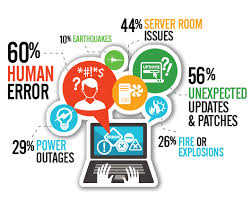
password-hackedAnd here is the second hard lesson: regardless of how good a defense companies put up against outside hacks, they’re only as good as their weakest link in the security chain which more often than not is human error. In Sony’s case, that meant the problem could have come from within, as simple as someone unwittingly opening those carefully constructed security doors to let the attackers in. For all that companies train and advise their staff, they cannot control their every move or decision. Malware has become an art form in deception, reflecting the spectrum of human weakness.

My hard look at the bottom line: Sony didn’t know how the GOP would strike, but they knew they were at risk, and who the threat was. If this attack could be attributed to state-sponsored North Korean hackers, then current concerns being expressed for the safety of our critical infrastructure need more than words and firewalls. The onus was on Sony to secure their assets, ensuring what measures they had in place were effective. If due diligence is where we can all fall short, we need to close that door or risk more events like this.

.

Welcome to Fortress Security

imagesYour home is your castle. It’s filled with pictures and memories, set up just the way you like, more than just the money you paid for it. You buy insurance to cover the cost of replacing it lest anything should ever happen to it but the truth is – it’s irreplaceable. Nobody wants to go through the heartache or headache of massive loss or damage.  But that’s exactly what happens when our computers crash or phones go missing. We put the equivalent of our entire lives on tech devices. We have become a mobile society.

Most people know about anti-virus software and backups. A percentage use these to safeguard their tech and their data. But the reality is that most people have no idea just how vulnerable they are and what their actual exposure to damage and loss is.  Today, the real risk isn’t dropping a phone into a puddle or circuits frying. It’s something lurking in the shadows, waiting for you to swipe your credit card, visit a website, or open an email attachment. Cybercrime has become a significant player in the new global economy, and it’s here to stay.

If only hackers were those sharply savvy caricatures dressed in black we enjoy in movies. But there is nothing charming or funny about gangs of thugs whose sole motivation is to get rich by ruining the lives of others. And that is the true essence of cybercrime. Our personally identifiable information, or PII, is the new currency of the blackmarket. Usercodes, passwords, drivers licence numbers, home addresses -we are broken down to bits and pieces, sold to the highest bidder, who will then recreate a whole new identity at our cost.

As it stands, the black hats are keeping more than  one step ahead.  For those of us in information security, or InfoSec, it’s a frustrating game of catch-up.  Which means damage control more than damage prevention.  The stakes are high, the payoffs are huge, and the playing field is global. But knowledge is power in this fight. As malware evolves and data breaches make nightly news, for the average user that really will mean an ounce of prevention is worth a pound of cure.